v1.5.6: Certificate Store, Easier HTTPS Changes, and Safer Certificate Rollovers
Version 1.5.6 adds Certificate Store, integration certificate assignment, safer default HTTPS selection, and automatic recovery after certificate changes.
Version 1.5.6 improves how operators manage HTTPS and integration certificates.
✨ New Features
Certificate Store
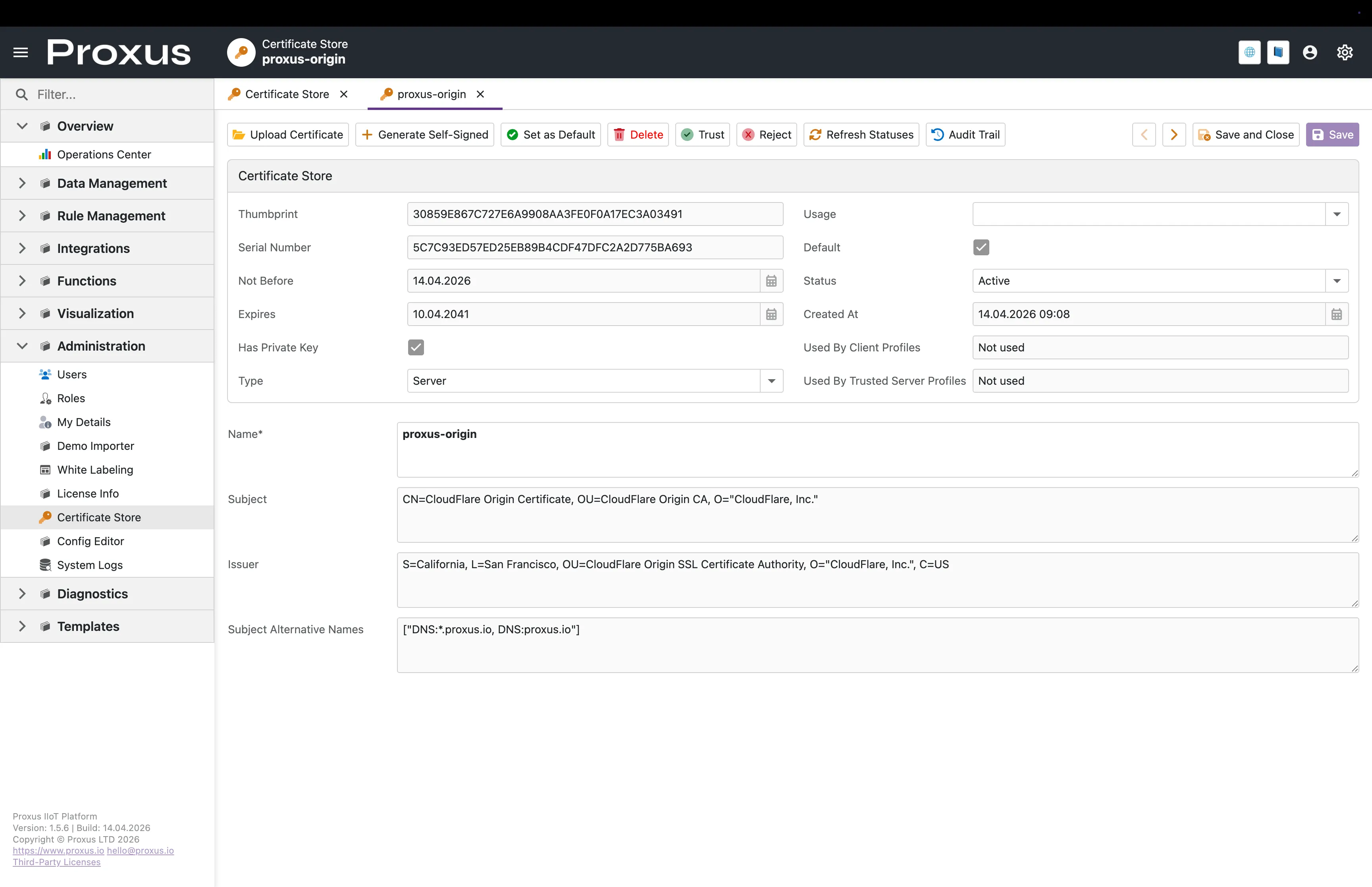
One place for certificate work: HTTPS, OPC UA trust, and integration certificates are managed from a single screen.
Clear certificate detail: Operators can see expiry, type, private-key status, usage, and profile references before applying a certificate.
Starter certificate on first setup: New environments can come up with an automatically generated self-signed certificate until a production certificate is imported.
Certificate Store detail view
Integration certificate assignment
Cleaner assignment flow: AWS IoT Core, MQTT, Sparkplug B, and OPC UA use certificates selected from the UI.
Less manual editing: Proxus resolves the runtime material automatically.
Cleaner profile forms: Internal runtime-only fields stay out of normal editing flows.
OPC UA trust management
Trusted and rejected certificate actions: Operators can manage trust decisions directly from the Certificate Store.
Visible trust usage: Certificate detail pages show whether a certificate is used by client or trusted-server profiles.
🔧 Improvements
Safer System Logs and support bundles
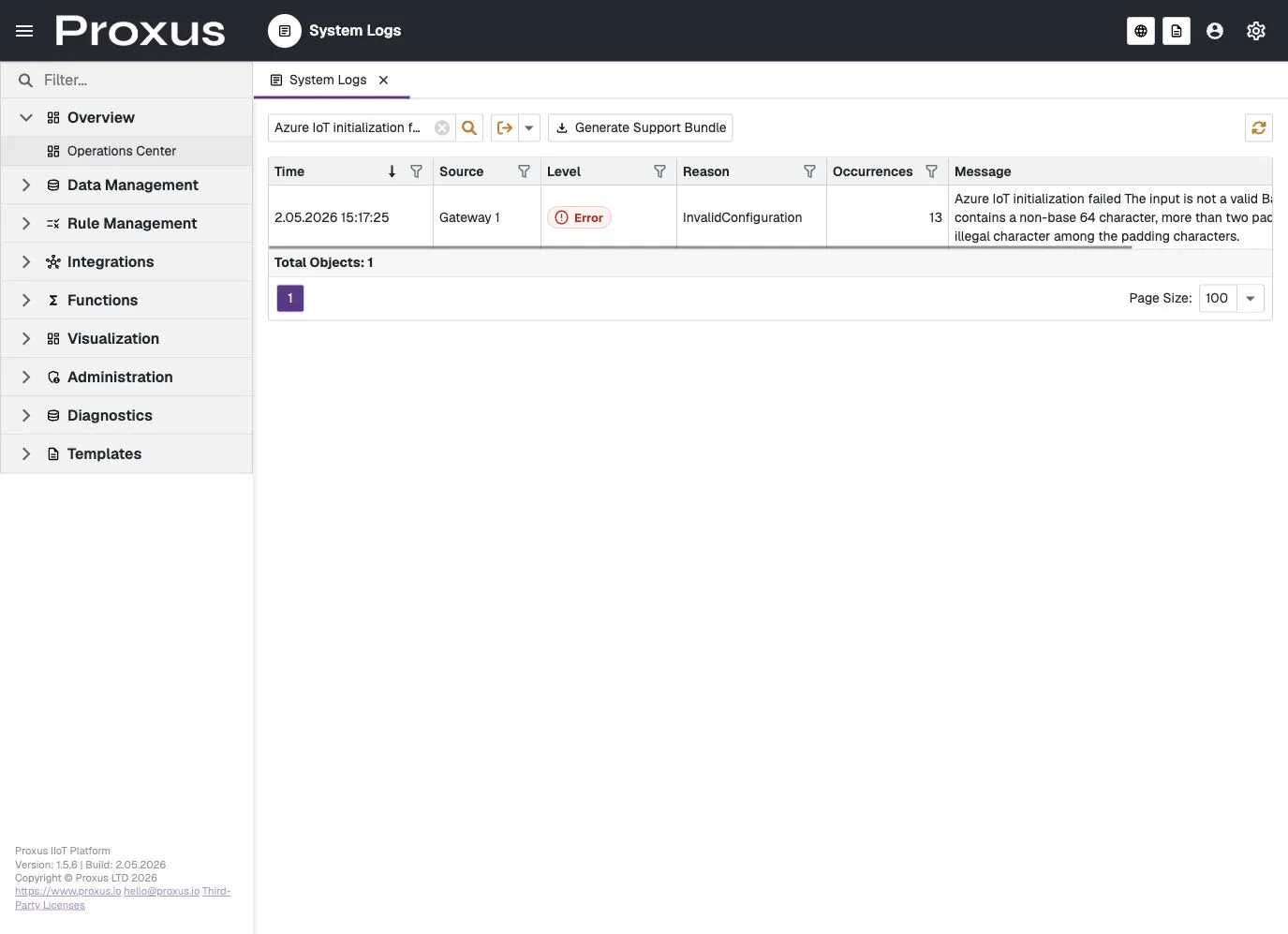
Cleaner operational log screen: System Logs now focuses on safe summaries, severity, reason, source, occurrence count, and the message operators need first.
Grouped repeated events: Repeated operational events are counted instead of flooding the list with identical rows.
Support bundle entry point: Operators can generate a support bundle from System Logs so support teams can investigate deeper evidence without exposing raw diagnostic details in the normal admin view.
System Logs operational view
Outbound Channel runtime health
Real connector status: Outbound Channels now show whether a connector is running, ready, degraded, stopped, in error, or not used.
Clearer troubleshooting: Last success, last failure, usage count, target type, and safe error summaries help operators understand whether a connector is actually sending data.
Device-level visibility: Device details now show outbound channel status directly in the Outbound Channels tab.
Anomaly review and rule candidates
Separated inspection from rule creation: Operators can inspect trend findings first, then switch to Candidate Review when they want to create a rule.
Runtime-backed findings: Spike, fast change, drift, flatline, and gap selections are carried into runtime rules.
Less noise by default: Flatline findings are more conservative and grouped in Inspect mode.
Safer default HTTPS selection
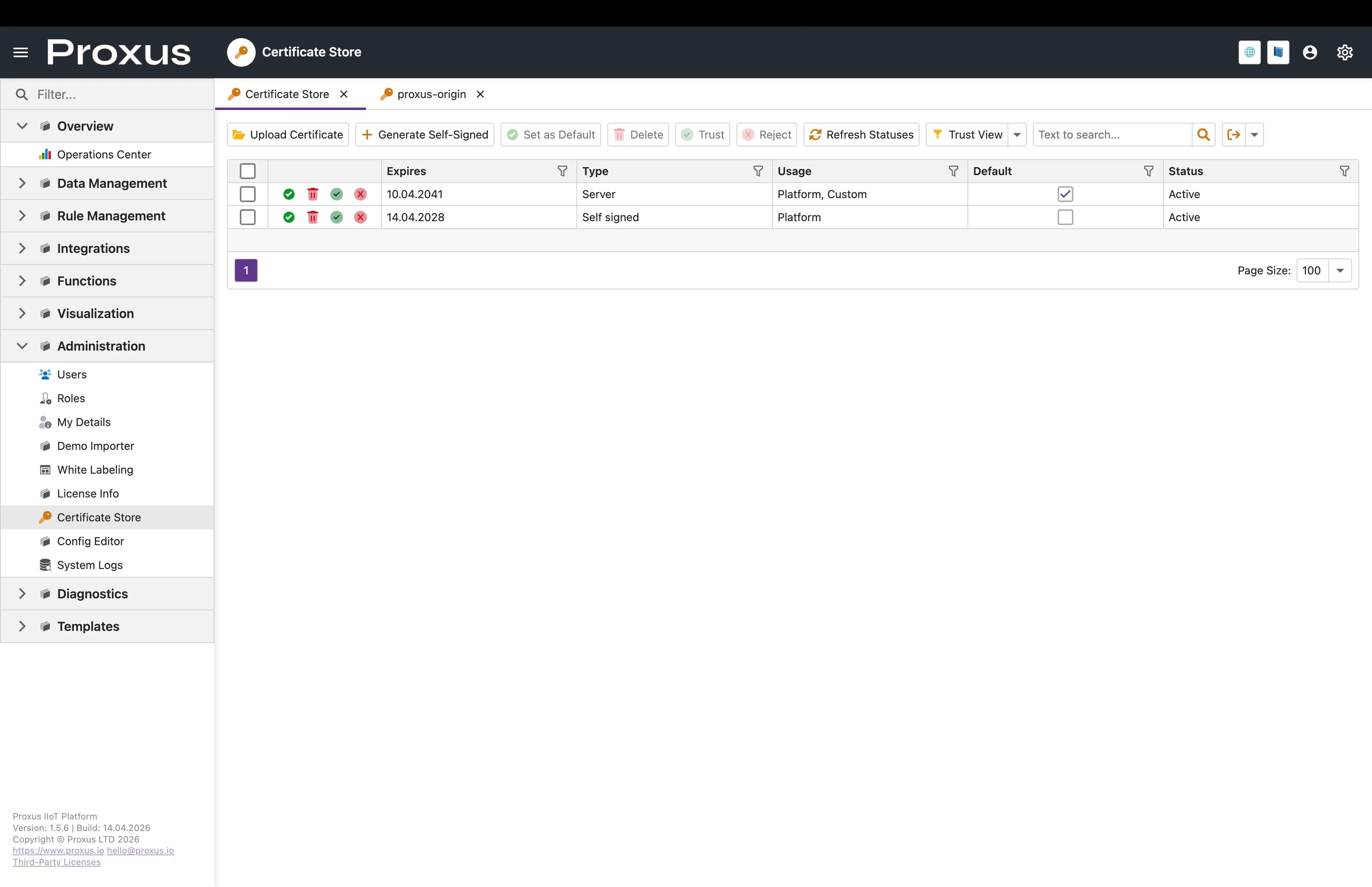
Private key check before activation: A certificate without a private key can no longer be used as the default HTTPS certificate.
Single active default: Proxus keeps only one active default certificate.
Clearer titles: Certificate tabs and detail headers now prefer shorter, more readable names.
Certificate Store list view
Better Cloudflare readiness
Proper PEM + key import flow: Cloudflare Origin Certificates can now be imported together with their private key and used for platform HTTPS.
Safer guidance for Full (strict): Public certificates without private keys are stored correctly but rejected for HTTPS server mode.
Automatic recovery after certificate changes
UI recovery on restart: When the active UI HTTPS certificate changes, Proxus rotates the Data Protection key ring automatically.
Edge recovery on restart: The same protection now applies on the edge/runtime side.
Archived legacy keys: Older protected key files are archived during certificate rollover instead of blocking startup.
UI consistency updates
Consistent local typography: The UI uses bundled fonts so deployments do not depend on internet access for font rendering.
Material-style status badges: Device status, outbound connector status, rule state, alert state, and log level presentations are clearer and more consistent across lists and detail views.
Cleaner device routing language: Device detail pages now use Outbound Channels for external data routes.
☸️ Kubernetes HA Hardening
This release upgrades the Kubernetes HA deployment package so the high-availability target is actually high-availability under node and pod failure.
Replicated messaging for high availability
Replicated streams by default in HA: Every durable message stream now runs with three replicas across the three messaging pods, so a single pod can fail without dropping in-flight messages.
Environment-driven setting: The replication factor is controlled by an environment variable on the UI and Gateway pods. Production HA uses three replicas; the existing Docker single-node deployment continues to use one replica with no change.
Continuous flow during rolling updates: With three-replica streams, messaging pod restarts no longer interrupt message flow.
Pod Disruption Budgets
Drain protection: A node drain or maintenance event can no longer take more than one messaging pod or UI pod offline at the same time.
Quorum preserved: The three-pod messaging cluster keeps quorum during routine cluster operations.
Prometheus metrics endpoint
Built-in messaging metrics: Each messaging pod now exposes a Prometheus-compatible metrics endpoint on port 7777 for stream, route, leaf, and gateway statistics.
Scrape-ready service: A dedicated headless service publishes the metrics endpoint with standard Prometheus annotations.
Better pod placement
Messaging anti-affinity: Messaging pods prefer separate cluster nodes when scheduling allows it.
Topology spread for UI: UI replicas spread across cluster nodes to avoid co-locating both replicas on a single node.
Resource requests and limits
Predictable scheduling: UI, Gateway, and messaging workloads now declare CPU and memory requests and limits, so the scheduler can place them reliably and protect them from noisy neighbors.
Credentials in Kubernetes Secrets
No plaintext in manifests: Default messaging and database credentials no longer appear as plaintext arguments in the deployment manifests. They are read from Kubernetes Secrets at pod startup.
Drop-in rotation surface: Operators can rotate these values by updating the Secret without editing manifests.
Docker stays unchanged: The single-node Docker Compose deployment continues to work as before.
Cleaner cluster routing
Single headless service entry: Messaging cluster routes now use a single headless DNS entry instead of explicit per-pod routes, which removes the noisy duplicate-route log lines previously seen during pod restarts.
🐛 Bug Fixes
Environment variable overrides now apply to every configuration setting
TOML overrides reliably: Setting an environment variable now overrides the corresponding Proxus-config.toml value for every section, including messaging credentials, gateway identity, MQTT broker token, edge mode, and integration mode. These settings were previously read directly from the file and ignored environment variables in some deployments.
Standard .NET notation: Use double underscores between hierarchy levels (for example Database__ConnectionString, EdgeGateway__GatewayID, Security__Password__MinLength). The TOML key casing is preserved.
Empty values still override: An environment variable set to an empty string overrides the TOML value with an empty string. To fall back to the TOML value, remove the variable entirely instead of setting it to "".
Changing the default HTTPS certificate is expected to invalidate existing sessions and cookies.
Restart the affected service after setting a new default HTTPS certificate.
For Cloudflare Full (strict), import both the certificate and the private key.
Apply Kubernetes manifests with kubectl apply -k <overlay-dir> (kustomize). Applying individual files with -f does not pick up the namespace declared in the kustomization and can create resources in the wrong namespace.
Before going to production, change the default messaging and database credentials stored in Kubernetes Secrets.
Review existing deployment manifests for environment variable names that follow the previous UPPERCASE_SINGLE_UNDERSCORE convention. Those names did not take effect before and are still inert; rename them to the documented Section__Key form to apply the override.
We use essential cookies for our website to function properly and analytics cookies to improve your experience.
Read our Cookie Policy for more information.
rocket_launch
Leaving before trying Proxus?
Try Proxus on your own infrastructure for free. Fill in the form and our team will set up a custom environment for you.