
The OPC UA driver provides a secure, standards-compliant client for modern PLCs and SCADA gateways with automatic session recovery.
Connection Parameters
Basic Settings
| Parameter | Type | Required | Default | Description |
|---|---|---|---|---|
| EndpointUrl | string | Yes | - | OPC UA server URL (e.g., opc.tcp://10.0.0.5:4840) |
| PollingInterval | int | No | 1000 | Read cycle interval in milliseconds |
| ConnectTimeout | TimeSpan | No | 00:00:15 | Connection timeout |
| ReceiveTimeout | TimeSpan | No | 00:00:15 | Response timeout |
| SessionTimeout | TimeSpan | No | 01:00:00 | Session expiration (minimum 1 hour) |
| KeepAliveInterval | TimeSpan | No | 00:00:10 | Keep-alive ping interval |
Authentication
| Parameter | Type | Required | Description |
|---|---|---|---|
| Username | string | No | Username for authenticated connections |
| Password | string | No | Password for authenticated connections |
If Username and Password are not provided, the client connects using anonymous authentication.
Security Configuration
Security Mode
| Value | Description |
|---|---|
None | No security (default) |
Sign | Messages are signed but not encrypted |
SignAndEncrypt | Messages are signed and encrypted |
Security Policy
| Value | Algorithm |
|---|---|
None | No security |
Basic256Sha256 | SHA256 with RSA (recommended) |
Aes128_Sha256_RsaOaep | AES-128 with SHA256 |
Aes256_Sha256_RsaPss | AES-256 with SHA256 PSS |
Basic256 | Legacy SHA1 (deprecated) |
Basic128Rsa15 | Legacy RSA 1.5 (deprecated) |
Certificate Settings
| Parameter | Type | Description |
|---|---|---|
| CertificatePath | string | Path to client certificate (.pfx) |
| CertificatePassword | string | Password for client certificate |
| ServerCertificatePath | string | Path to server certificate (.der/.cer) to trust |
When using Sign or SignAndEncrypt mode, Proxus automatically generates a self-signed client certificate on first connection. The OPC UA server must trust this certificate before secure communication can begin.
First-time setup:
- Start a connection attempt from Proxus - it will fail with
BadSecureChannelClosedorBadSecurityChecksFailed. - Open your OPC UA server's certificate management (e.g., Prosys Simulation Server → Certificates tab).
- Move the Proxus client certificate from the Rejected list to the Trusted list.
- Reconnect from Proxus - the secure session will now be established.
This is standard OPC UA behavior and only needs to be done once per server. After the certificate is trusted, subsequent connections (including automatic reconnections) will work without intervention.
OPC UA Discovery
Proxus can automatically discover OPC UA servers and their security configurations on your network. This eliminates the need to manually enter endpoint URLs and security settings.
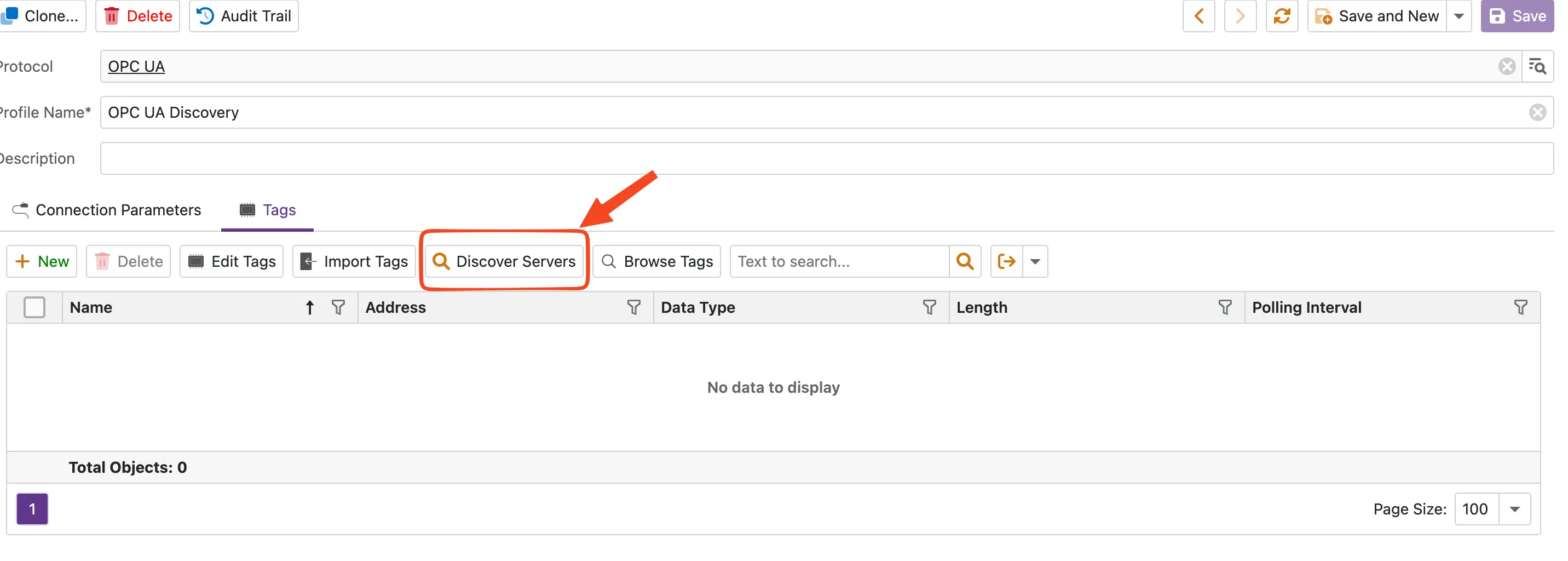
Step 1: Start Discovery
Open a Device Profile with the OPC UA protocol and navigate to the Tags tab. Click the Discover Servers button.
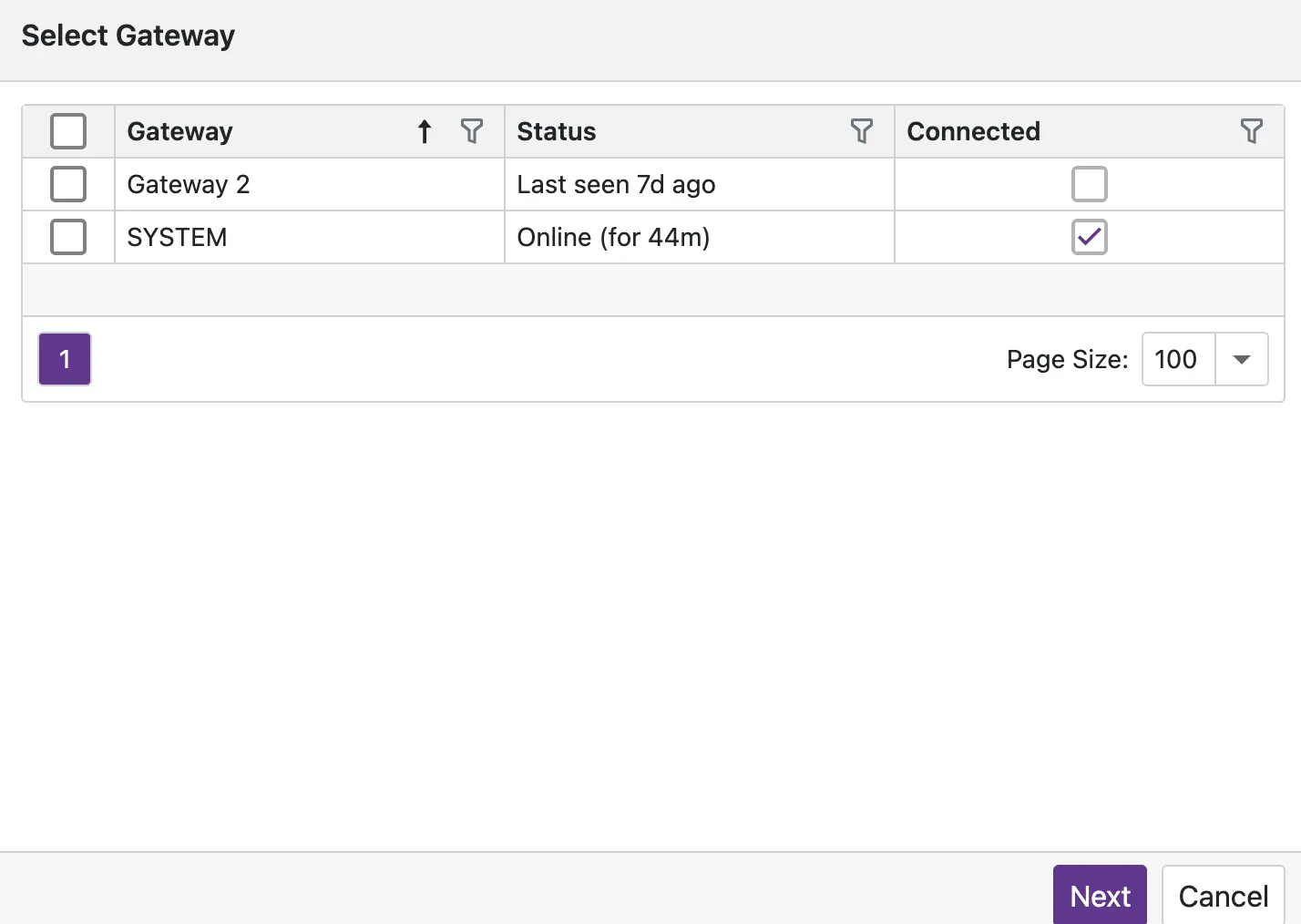
Step 2: Select Gateway
Choose an online gateway that has network access to the OPC UA server. Click Next to proceed.
Step 3: Review Discovery Results
The discovery tree shows all detected servers, endpoints, security configurations, and authentication options in a hierarchical view. Select the desired endpoint and authentication combination, then click Next to apply.
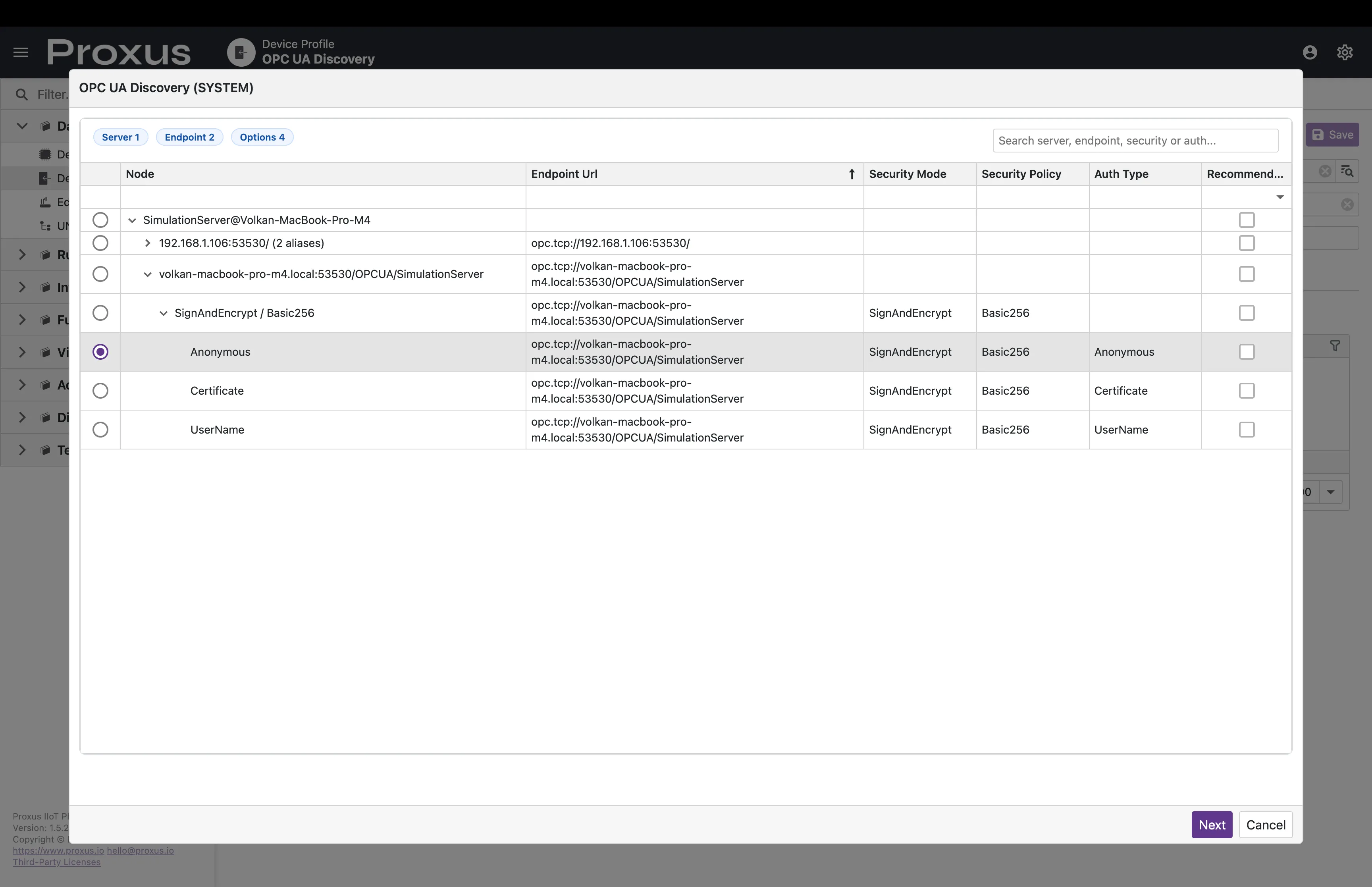
When you confirm your selection, Proxus automatically populates the connection parameters (Endpoint URL, Security Mode, Security Policy) in the device profile. A preflight connection test is performed to verify connectivity before saving.
Browse Tags
After configuring connection parameters (either manually or via Discovery), you can browse the OPC UA server's address space to select tags visually.
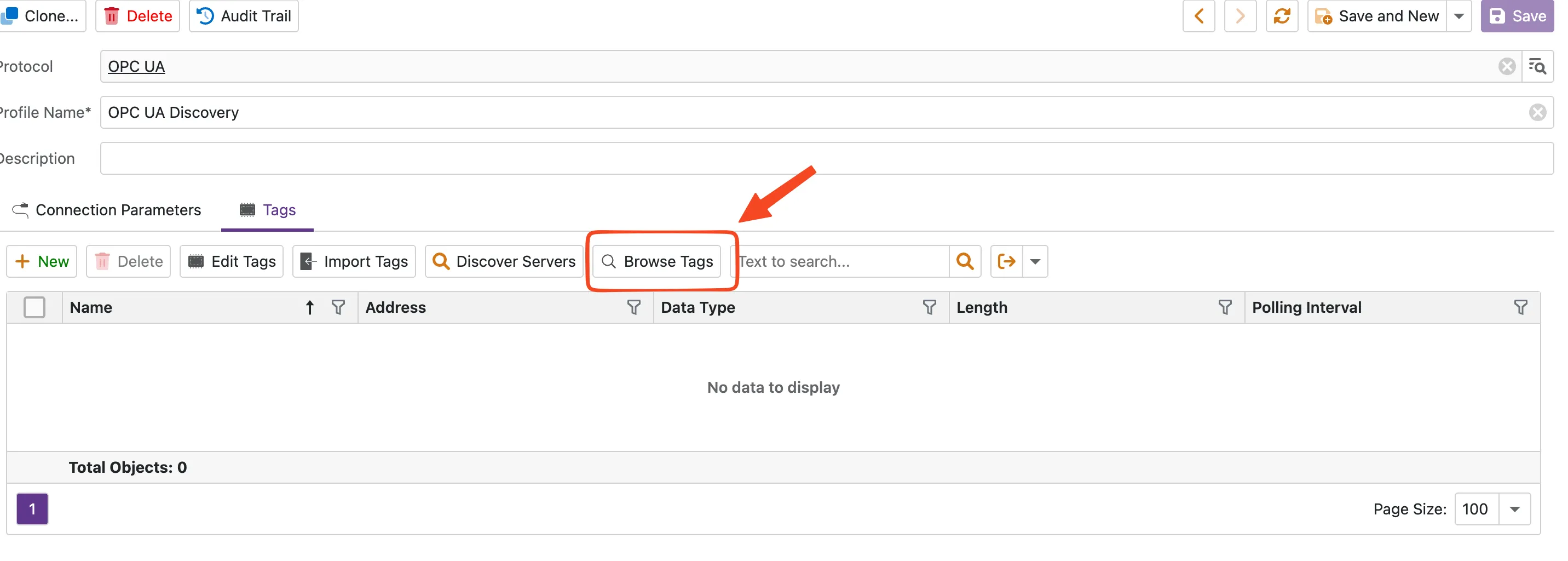
Step 1: Open Tag Browser
On the Tags tab, click the Browse Tags button.
Step 2: Browse and Select
The browser displays the server's node hierarchy. Expand folders to find variables, check the nodes you want to monitor, and click OK to import them as tags.
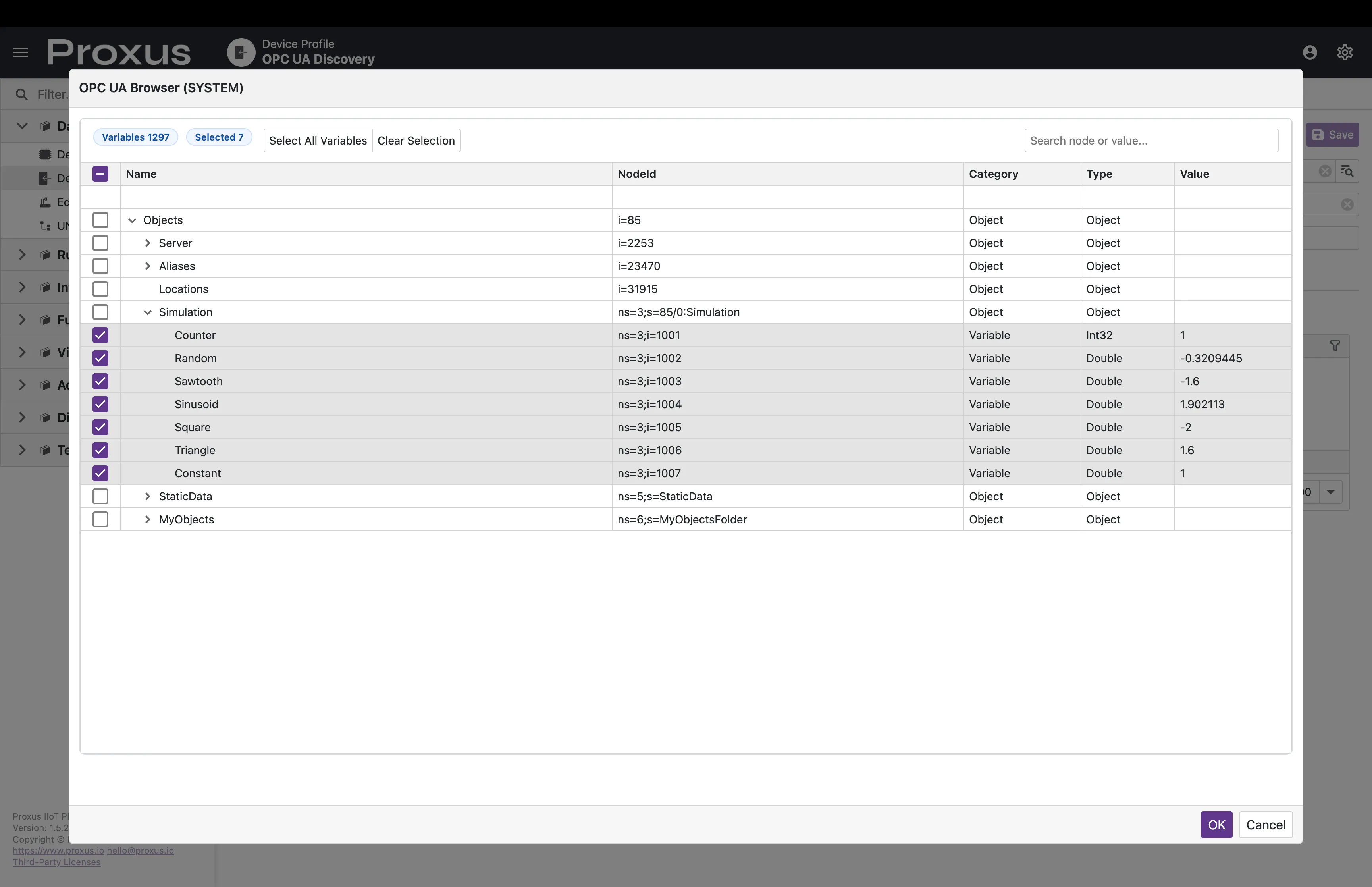
Use Select All Variables to select all variable nodes in the current view, or click individual checkboxes for granular selection.
Node Addressing
Proxus supports all standard OPC UA Node ID formats.
Node ID Formats
| Format | Prefix | Example | Description |
|---|---|---|---|
| String | s= | ns=2;s=Device1.TagA | String identifier |
| Numeric | i= | ns=3;i=10024 | Numeric identifier |
| GUID | g= | ns=4;g=72962B91-... | GUID identifier |
| Opaque | b= | ns=5;b=QVVJ... | Base64-encoded opaque |
Namespace Index
The ns= prefix specifies the namespace index:
| Namespace | Description |
|---|---|
ns=0 | OPC UA standard namespace |
ns=1 | Server-specific namespace |
ns=2+ | Application namespaces |
Examples
ns=2;s=Channel1.Device1.Tag1 → String node in namespace 2
ns=2;s=PLC/Temperature → Hierarchical path
ns=3;i=1001 → Numeric node ID
ns=0;i=2259 → OPC UA Server Status node
Advanced Settings
Transport Quotas
| Parameter | Type | Default | Description |
|---|---|---|---|
| MaxStringLength | int | 65535 | Maximum string length |
| MaxArrayLength | int | 65535 | Maximum array length |
| MaxByteStringLength | int | 65535 | Maximum byte string length |
| MaxMessageSize | int | 4194304 | Maximum message size (4 MB) |
Application Identity
| Parameter | Type | Description |
|---|---|---|
| ApplicationName | string | Client application name |
| ApplicationUri | string | Application URI (auto-generated if not set) |
| ProductUri | string | Product URI |
Data Types
| Proxus Type | OPC UA Type | Description |
|---|---|---|
| Bool | Boolean | True/False |
| Short | Int16 | Signed 16-bit |
| UShort | UInt16 | Unsigned 16-bit |
| Int | Int32 | Signed 32-bit |
| UInt | UInt32 | Unsigned 32-bit |
| Long | Int64 | Signed 64-bit |
| ULong | UInt64 | Unsigned 64-bit |
| Float | Float | 32-bit IEEE 754 |
| Double | Double | 64-bit IEEE 754 |
| String | String | UTF-8 string |
Performance Features
Automatic Session Recovery
If the network drops or the server restarts, the driver handles reconnection automatically:
- Recreates sessions transparently
- Re-establishes subscriptions
- No manual intervention required
- Up to 5 internal retries before reporting errors
Batch Reading
Multiple tag reads are grouped into a single ReadRequest, reducing network round-trips significantly.
Node ID Caching
Parsed Node IDs are cached to avoid repeated parsing overhead.
Troubleshooting
| Error | Cause | Solution |
|---|---|---|
| BadSecureChannelClosed | Server does not trust the client certificate | Trust the Proxus certificate on the OPC UA server (see Certificate Trust above) |
| BadSecurityChecksFailed | Security mode/policy mismatch or untrusted certificate | Verify the selected mode+policy matches what the server offers; trust client certificate |
| BadCertificateUntrusted | Certificate not trusted | Move client certificate to Trusted folder on Server |
| BadUserAccessDenied | Invalid credentials | Verify Username/Password for the endpoint |
| BadNodeIdUnknown | Typo in Node ID | Copy Node ID directly from UaExpert or server GUI |
For Node ID format help, see OPC UA Address Syntax. For common OPC UA errors, see OPC UA Errors.
For a unified view of all protocol browsers, see the Tag Browser page.
Official Resources
- OPC Foundation: OPC UA Online Reference
- OPC Foundation: OPC UA Specifications