
Config Editor
Where to find it
- UI Path: Administration → Config Editor
What it does
Config Editor lets you modify the server configuration from the Management Console.
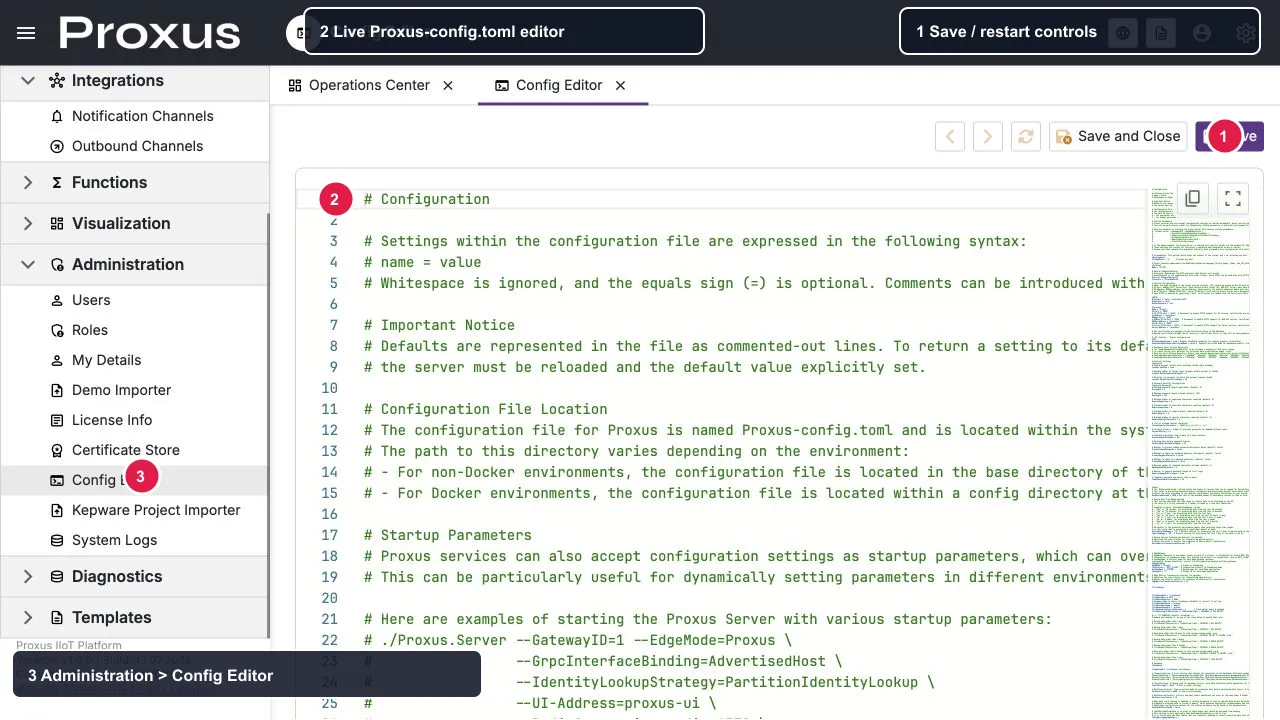
The screen shows the current Proxus-config.toml content in the editor. The numbered markers identify the Administration navigation, the editable configuration document, and the Save / Save and Close actions. The values shown are from the local English demo environment.
How it relates to the config file
- The editor reads and writes the
Proxus-config.tomlfile used by the running installation. Environment variables and startup arguments can still override file values; see Configuration File Reference for precedence and mapping. - In Docker, prefer environment variables for overrides.
- Use Config Editor when you need controlled changes through the UI.
Common workflow
Open the editor
Go to Administration → Config Editor.
Make a small change
Change one setting at a time so it’s easy to validate and roll back. Keep a known-good copy before editing production configuration.
Save and confirm
Choose Save or Save and Close. The editor presents a confirmation warning because an invalid configuration can make the platform inoperable. Cancel the confirmation to leave the file unchanged.
Restart when ready
After the file is written, the editor asks whether to restart the platform. Confirm the restart only when the maintenance window and dependency impact are understood. If you decline, the file is changed but the new values do not take effect until the relevant service is restarted.
Apply vs restart behavior
- Requires service restart: Changes take effect only after the relevant platform service is restarted. This is a service restart, not necessarily a host reboot.
After the restart, reopen Config Editor to confirm the persisted file, then check the related UI screen and system logs. Also verify any environment variables or startup arguments that may override the file.
Permissions
- Access is restricted by the Management Console's navigation and object permissions. A user must be explicitly authorized to open and edit Config Editor; verify the effective role before granting access.
Rollback (recommended)
- Keep a known-good configuration snapshot before saving.
- If something breaks, restore the snapshot, restart the affected service, and verify the health and dependent connections.