
The SNMP driver provides native support for monitoring network devices, switches, routers, UPS systems, environmental sensors, and any SNMP-enabled industrial equipment.
Connection Parameters
Basic Settings
| Parameter | Type | Required | Default | Description |
|---|---|---|---|---|
| Host | string | Yes | - | SNMP agent IP address or hostname (e.g., 192.168.1.10) |
| Port | int | No | 161 | SNMP agent port |
| Version | string | No | Version2c | SNMP version: Version1, Version2c, or Version3 |
| PollingInterval | int | No | 1000 | Read cycle interval in milliseconds |
| ConnectTimeout | TimeSpan | No | 00:00:05 | Connection timeout |
| ReceiveTimeout | TimeSpan | No | 00:00:05 | Response timeout |
| Retries | int | No | 1 | Number of retry attempts on failure |
SNMPv1/v2c Authentication
| Parameter | Type | Required | Default | Description |
|---|---|---|---|---|
| Community | string | No | public | Community string for read access |
For SNMPv1 and v2c, the community string acts as a simple password. Use public for read-only access (default) or configure a custom string matching your device.
SNMPv3 Security
SNMPv3 provides authentication and encryption for secure SNMP communication.
Security Levels
| Value | Description |
|---|---|
NoAuthNoPriv | No authentication, no encryption (default) |
AuthNoPriv | Authentication only, no encryption |
AuthPriv | Authentication and encryption |
SNMPv3 Parameters
| Parameter | Type | Required | Description |
|---|---|---|---|
| Username | string | Yes (v3) | SNMPv3 security name |
| Password | string | Conditional | Authentication password (required for AuthNoPriv and AuthPriv) |
| AuthProtocol | string | No | Authentication protocol: MD5, SHA1 (default), SHA256 |
| PrivacyPassword | string | Conditional | Encryption password (required for AuthPriv; falls back to Password if not set) |
| PrivacyProtocol | string | No | Encryption protocol: DES, AES (default: DES) |
| SecLevel | string | No | Security level override |
| EngineId | string | No | SNMP engine ID (auto-discovered if not set) |
SNMPv3 requires at minimum a Username. For AuthNoPriv level, a Password and AuthProtocol are also required. For AuthPriv level, additionally a PrivacyPassword and PrivacyProtocol are needed.
OID Addressing
SNMP uses Object Identifiers (OIDs) to identify monitored values.
OID Format
OIDs are dot-separated numeric sequences that form a hierarchical tree:
1.3.6.1.2.1.1.1.0     → sysDescr (System Description)
1.3.6.1.2.1.1.3.0     → sysUpTime (System Uptime)
1.3.6.1.2.1.2.2.1.10  → ifInOctets (Interface Input Bytes)
Common OID Prefixes
| Prefix | MIB | Description |
|---|---|---|
1.3.6.1.2.1.1 | SNMPv2-MIB | System information (description, uptime, contact) |
1.3.6.1.2.1.2 | IF-MIB | Network interface statistics |
1.3.6.1.2.1.25 | HOST-RESOURCES | Host resources (CPU, memory, disk) |
1.3.6.1.4.1 | Enterprise | Vendor-specific OIDs |
Examples
1.3.6.1.2.1.1.1.0     → System description string
1.3.6.1.2.1.1.3.0     → System uptime in timeticks
1.3.6.1.2.1.2.2.1.6.1 → MAC address of interface 1
1.3.6.1.2.1.25.3.3.1.2.1 → CPU load percentage
1.3.6.1.4.1.318.1.1.1.2.2.1.0 → APC UPS battery capacity
Browse Tags
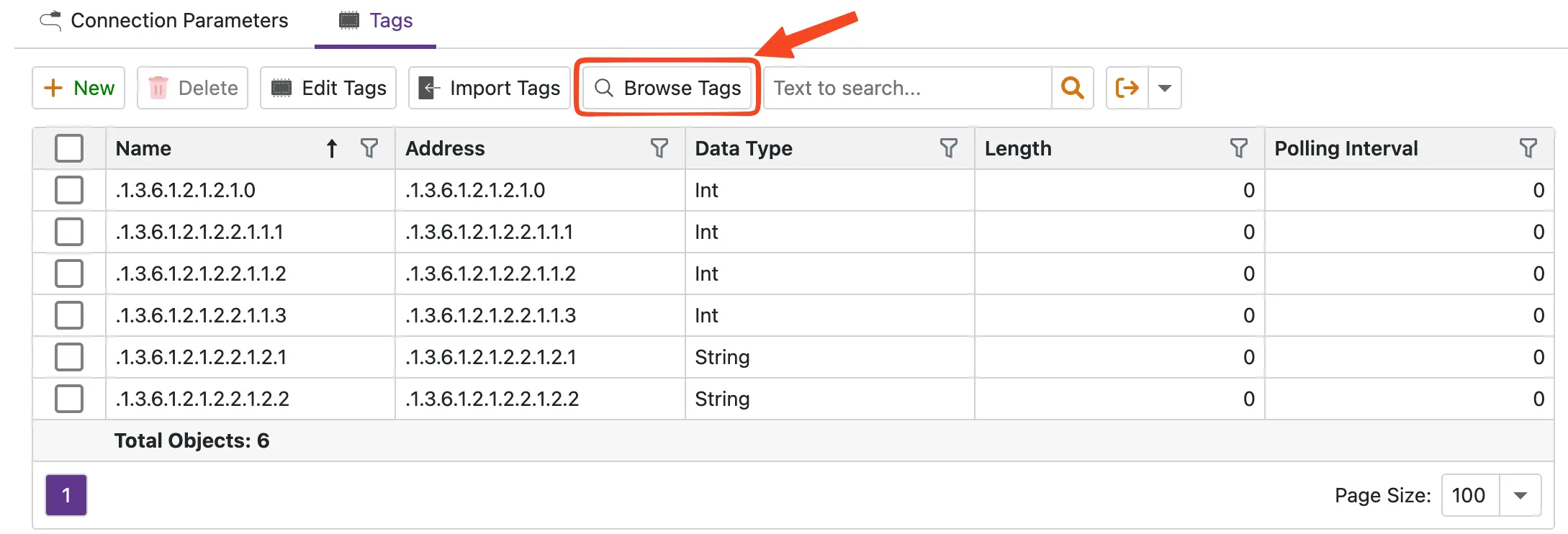
After configuring connection parameters, you can browse the SNMP agent's MIB tree to select OIDs visually. On the Tags tab, click the Browse Tags button.
The browser performs an SNMP walk starting from the configured root OID and displays all discovered OIDs with their current values. Select the OIDs you want to monitor and import them as tags.
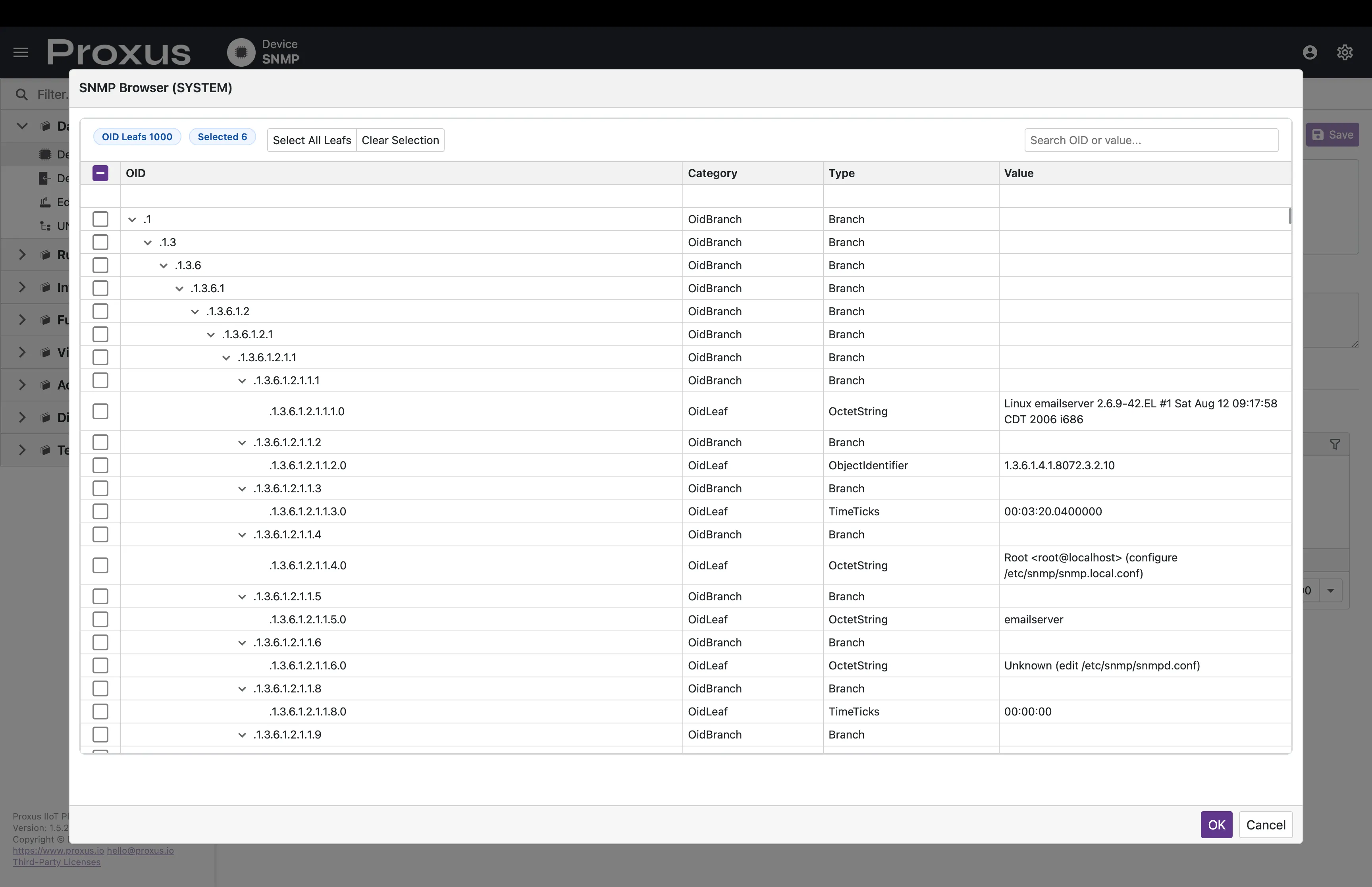
All SNMP walk operations are executed through the selected edge gateway, ensuring the browser accesses devices on the gateway's local network.
Advanced Settings
Transport Quotas
| Parameter | Type | Default | Description |
|---|---|---|---|
| MaxStringLength | int | 65535 | Maximum string value length |
| MaxArrayLength | int | 65535 | Maximum array length |
| MaxByteStringLength | int | 1048576 | Maximum byte string length (1 MB) |
| MaxMessageSize | int | 4194304 | Maximum SNMP message size (4 MB) |
| DisableBatchRead | bool | false | Force sequential reads instead of batch GET |
Data Types
| Proxus Type | SNMP Type | Description |
|---|---|---|
| Bool | Integer32 | 0 = false, non-zero = true |
| Short | Integer32 | Signed 16-bit |
| UShort | Integer32 | Unsigned 16-bit |
| Int | Integer32 | Signed 32-bit |
| UInt | Gauge32 / Counter32 | Unsigned 32-bit |
| Long | Counter64 | Signed 64-bit |
| ULong | Counter64 | Unsigned 64-bit |
| Float | OctetString | IEEE 754 32-bit (encoded as string) |
| Double | OctetString | IEEE 754 64-bit (encoded as string) |
| String | OctetString | UTF-8 text |
Performance Features
Batch Reading
Multiple OID reads are grouped into a single SNMP GET request, reducing network round-trips. Use DisableBatchRead to fall back to sequential reads if your device has limitations with multi-OID requests.
OID Caching
Parsed OIDs are cached per adapter instance to avoid repeated parsing overhead.
Automatic Retry
Failed reads are retried up to the configured Retries count with automatic reconnection between attempts.
Troubleshooting
| Error | Cause | Solution |
|---|---|---|
| Timeout | Agent not responding | Check network connectivity, verify host/port, increase timeout |
| Cannot resolve host | DNS resolution failed | Use IP address instead of hostname, or fix DNS configuration |
| SNMP v3 requires Username | Missing v3 credentials | Set Username in connection parameters |
| Response error | Agent returned error status | Verify OID exists and community string has read access |
| No valid OIDs found | Invalid OID format in tags | Check OID syntax (dot-separated numbers) |
Use snmpwalk -v2c -c public <host> from the gateway to verify SNMP agent accessibility before configuring in Proxus.
For a unified view of all protocol browsers, see the Tag Browser page.