
This page explains what the Proxus performance benchmark measures, what it does not cover, and how to use the results in sizing discussions.
Overview
The results on this page describe single-gateway pipeline throughput under simulated field input.
They are intended to show how much traffic the Proxus collection-to-storage pipeline can process under controlled benchmark conditions. They do not represent a benchmark of real PLCs, CNCs, sensors, field networks, or protocol round-trip timing.
Across the verified profiles in this document, observed throughput ranged from roughly 0.55 billion to 29.8 billion processed operations per day.
The arithmetic mean across the verified profiles was roughly 8.9 billion processed operations per day.
The highest observed profile used:
16 devices1,000 tags per device50ms source polling- shared storage sink
- a
20smeasurement window after warmup
Under that profile, the observed result was roughly 27.19 billion processed operations per day. The lowest verified profile in the same set was roughly 0.55 billion operations per day.
This benchmark measures Proxus pipeline throughput under simulated input. It is not a hardware benchmark, and it should not be interpreted as an unconditional SLA.
Benchmark Snapshots
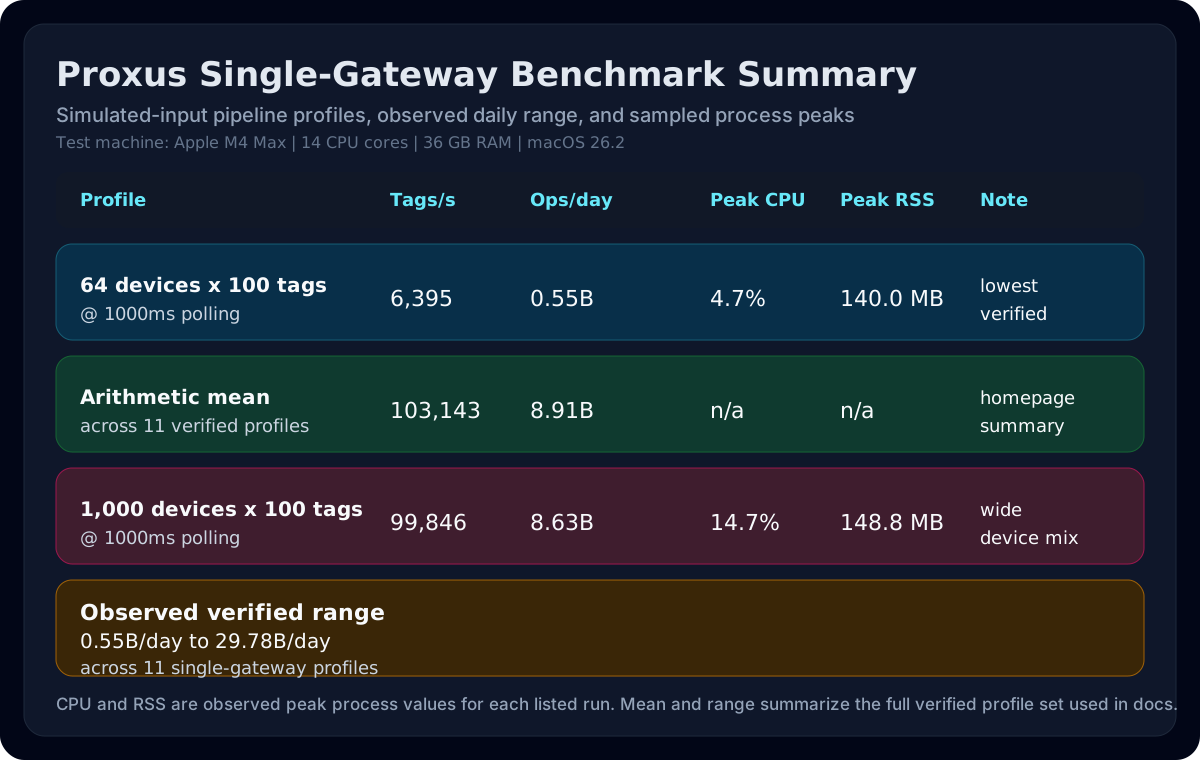
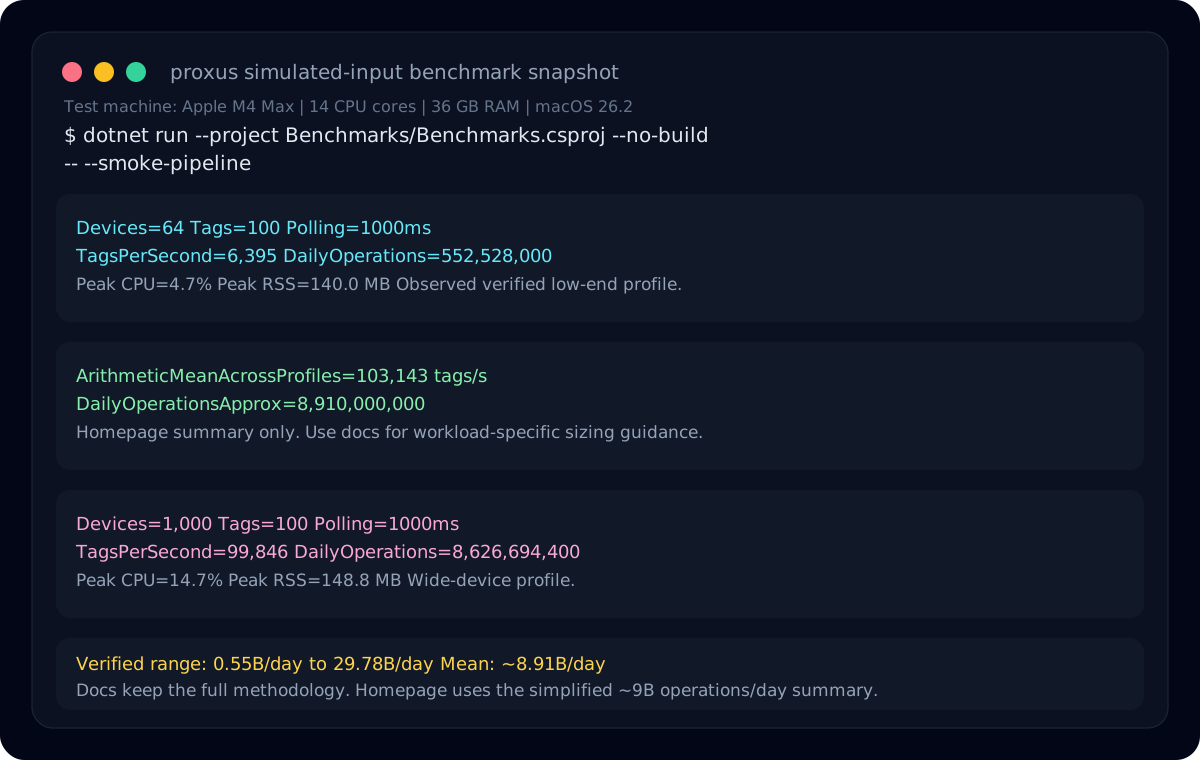
What This Benchmark Measures
The benchmark focused on the end-to-end path from simulated field input through the Proxus gateway pipeline:
- simulated data collection at the gateway
- processing and routing inside the platform
- delivery into storage
This makes the result more useful than an isolated database insert test, because it includes ingestion, scheduling, processing, routing, and storage delivery overhead inside the product.
What This Benchmark Does Not Measure
This benchmark does not measure:
- real device read latency
- PLC, CNC, RTU, or sensor response times
- protocol stack behavior on physical networks
- wiring, fieldbus congestion, or industrial switch latency
- vendor-specific device performance limits
If you need to understand hardware behavior, network latency, or protocol round-trip timing, run a workload-specific validation against the actual devices on the actual network.
Simulation Method
For these runs, field input was generated by the platform simulator path rather than by physical devices.
As a result, the benchmark is useful for answering:
- how much simulated device/tag traffic one gateway can process
- how the platform behaves as polling cadence and workload shape change
- what throughput the internal collection-to-storage pipeline can sustain
It does not answer how quickly a specific PLC family, CNC controller, or sensor fleet can be read in production.
Test Environment
The reported runs shared the following conditions:
- single gateway
- simulated field input
- shared storage sink
20smeasurement window after warmup- Apple M4 Max test machine
14CPU cores36 GBRAMmacOS 26.2
Two benchmark families were used:
- Baseline profile: production-like
1000mspolling - High-frequency profile: more aggressive polling such as
100ms,50ms, or25ms
How To Interpret The Result
Use the result as a pipeline sizing reference, not as a final deployment commitment.
It is most useful for answering:
- what order of magnitude a single gateway can handle under simulated field input
- whether one gateway is likely to be sufficient for an initial rollout
- when a deployment should move from single-node sizing to scale-out planning
It should not be used to claim that every workload will reach the same daily volume, and it should not be presented as proof of real-device read performance.
For public messaging, the arithmetic mean is the most balanced summary. For engineering decisions, use the full profile table rather than a single headline number.
Reference Measurements
The following measurements were collected from isolated smoke benchmark runs with simulated input. Daily volume is derived from the observed processed tag rate for each run.
| Profile | Polling | Tags/s | Operations/day | Peak CPU | Peak RSS |
|---|---|---|---|---|---|
64 devices x 100 tags | 1000ms | 6,395 | 552,528,000 | 4.7% | 140.0 MB |
64 devices x 100 tags | 500ms | 13,269 | 1,146,441,600 | 5.7% | 139.9 MB |
64 devices x 100 tags | 250ms | 25,554 | 2,207,865,600 | 20.5% | 147.4 MB |
64 devices x 100 tags | 100ms | 63,505 | 5,486,832,000 | 20.0% | 148.5 MB |
1000 devices x 100 tags | 1000ms | 99,846 | 8,626,694,400 | 14.7% | 148.8 MB |
16 devices x 1,000 tags | 1000ms | 14,795 | 1,278,288,000 | 18.0% | 148.8 MB |
16 devices x 1,000 tags | 500ms | 31,687 | 2,737,756,800 | 26.0% | 148.9 MB |
16 devices x 1,000 tags | 250ms | 63,904 | 5,521,305,600 | 21.7% | 147.9 MB |
16 devices x 1,000 tags | 100ms | 158,343 | 13,680,835,200 | 8.3% | 147.4 MB |
16 devices x 1,000 tags | 50ms | 314,655 | 27,186,192,000 | 20.1% | 148.0 MB |
16 devices x 1,000 tags | 25ms | 344,625 | 29,775,600,000 | 25.9% | 147.8 MB |
CPU and RSS values shown here are the observed peak process values of the benchmark run itself. They are useful for comparing profiles, but they do not represent a full host-level capacity profile.
What Changes Throughput Between Deployments
Observed throughput changes significantly with workload shape:
- Device count: more devices increase coordination and scheduling overhead
- Tag density: more tags per device increase payload size and storage pressure
- Polling profile: faster polling produces more write pressure
- Retention and storage policy: write-heavy and long-retention setups need different sizing
- Concurrent analytics: dashboards, queries, and exports share system resources with ingestion
For this reason, two deployments with the same daily operation volume can behave very differently, especially once real devices and real networks are introduced.
Benchmark Limits
This benchmark does not answer every performance question.
It does not by itself define:
- query performance under mixed read/write load
- retention cost over long historical windows
- multi-gateway aggregation limits
- the exact maximum of every protocol or device mix
- real hardware read performance
If a deployment is expected to operate near the benchmark envelope, run a workload-specific validation with the expected device count, tag profile, polling cadence, network conditions, and real hardware.
For public messaging, keep the wording tied to simulated-input pipeline performance rather than real-device performance.