Reference · for Administrators, Engineers
Manage edge gateways
See whether each edge gateway is online, read its logs, set how long it buffers data, update or remove it, and revoke its access to the hub.
All edge gateways are listed in Connect > Edge Gateways, with the hub's own gateway, SYSTEM. Select a gateway to open its page.
The list
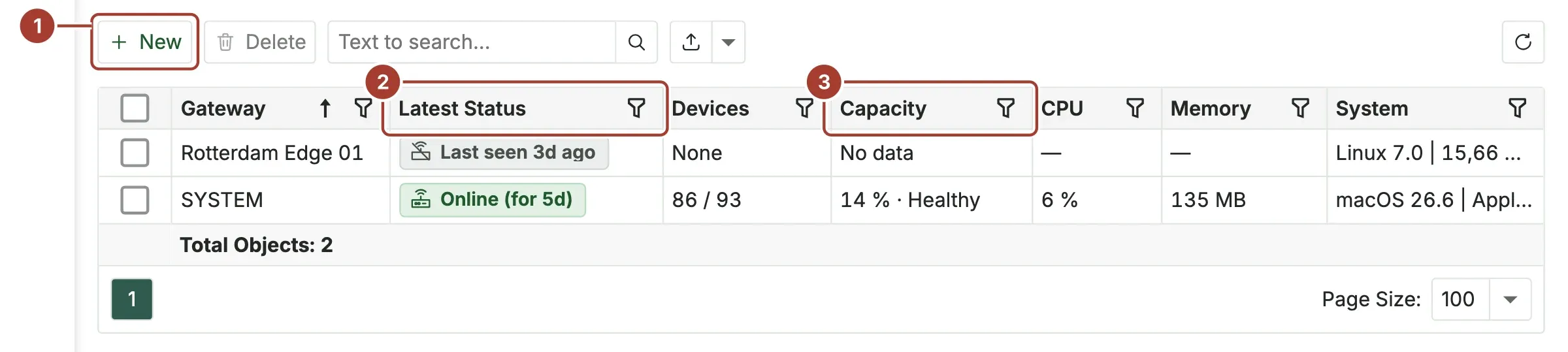
- New creates a gateway. See Install an edge gateway.
- Latest Status: whether the gateway is connected, and for how long.
- Capacity: how much of the licensed data rate the gateway uses.
| Column | What it shows |
|---|---|
| Gateway | The gateway's name. |
| Latest Status | See Status. |
| Devices | Devices sending data, out of all devices on this gateway, for example 74 / 75. None if it has no devices. |
| Capacity | The share of the licensed data rate, and Healthy, Warning, Critical or Exceeded. Stale when the gateway has not reported for more than 30 seconds. |
| CPU, Memory | What the gateway process uses on its machine. Empty while the gateway is offline. |
| System | The operating system, processor and memory of the gateway's machine. |
Status
| Status | Meaning |
|---|---|
| Online (for …) | Connected to the hub, for the time shown. |
| Never connected | The gateway was created but has not been installed, or has not connected yet. |
| Last seen … ago | The gateway was connected and has stopped reporting. |
| Not responding | The connection to the hub is up, but the gateway sends nothing. |
| Connection refused | The hub refused the gateway's connection, for example because its key is no longer valid. |
| Access revoked | Its access was revoked. It connects again only after a new install. |
The gateway page
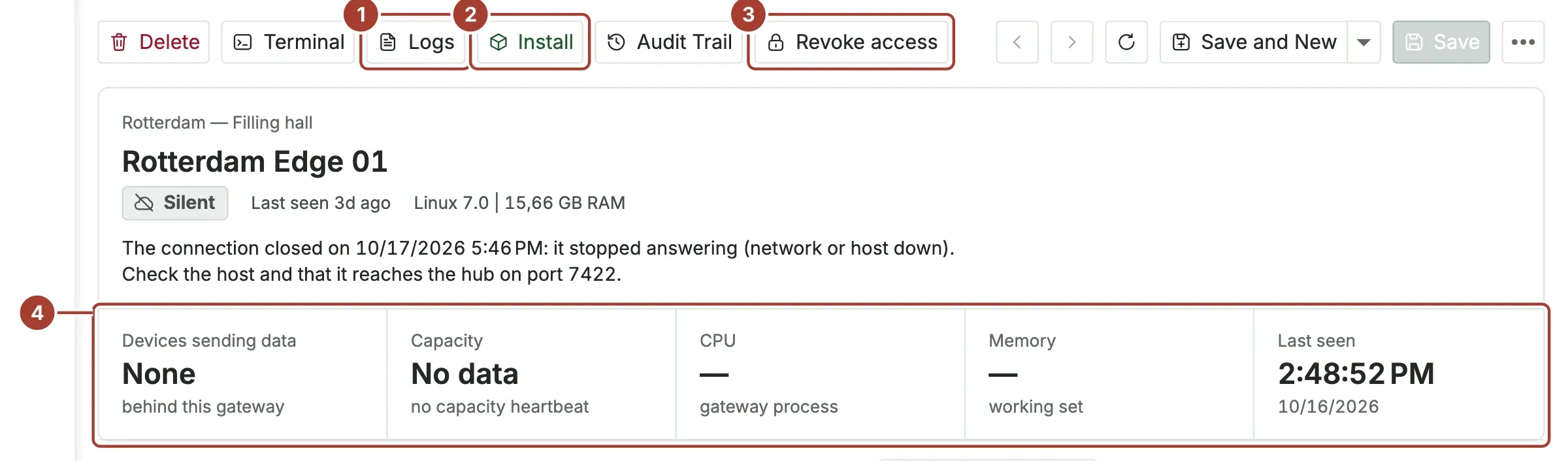
- Logs: the gateway's entries in the system log.
- Install: install, update or remove the gateway on its machine.
- Revoke access: disconnect the gateway from the hub at once.
- Devices sending data, Capacity, CPU, Memory and Last seen.
When the gateway is not connected, a sentence under its name says why and what to check, for example "Check the host and that it reaches the hub on port 7422."
The tabs below show:
| Tab | What it shows |
|---|---|
| Metrics | The license capacity of the gateway and a chart of its load. |
| Devices | The devices this gateway reads. |
| Functions, Rules, Pipelines | What runs on this gateway. |
| Access history | Each install, connection, disconnection and revocation, with the time, the address and the user. |
Configuration
Open Configuration at the bottom of the page:
| Field | What it is |
|---|---|
| Name | A unique name. Required. |
| Location | Where the gateway is, for example Rotterdam, filling hall. |
| Buffer Retention (hours) | How long the gateway keeps data it could not deliver to the hub. Default 48, from 1 to 720. |
| Source Domain | Leave empty. It is needed only for some partner-managed installations. |
| System Info | The gateway's machine, as the gateway reports it. Read only. |
Actions
| Action | What it does |
|---|---|
| Install | Opens the install window: a new command installs the gateway, or updates an installed gateway to the hub's current version and keeps its data. The command is pinned to the hub's HTTPS key and sets up the gateway's TLS link to the hub. Under Remove from its host, the window shows the command that removes the gateway's containers, data and folder from its machine; nothing else on the machine is touched. The remove command is pinned the same way. |
| Logs | Opens the system log entries of this gateway. Refresh reloads them; select an entry to read the whole message. On the edge machine itself, docker logs shows the container's output. |
| Terminal | Opens a command terminal to the gateway, after a confirmation. |
| Revoke access | Disconnects the gateway from the hub within seconds; its key stops working, and its devices stop sending data to the hub. It connects again only after a new install command is run on its machine. Proxus asks for confirmation first. |
| Audit Trail | Who changed the gateway's settings, and when. |
| Delete | Deletes the gateway and revokes its key. |
The gateway's certificate
Each gateway has its own certificate in Security > Certificate Store, named "gateway name (gateway N)", with the usage Gateway HTTPS and MQTT Broker. The hub issues it, covers the names and addresses the gateway's host reported at install, and renews it before it expires. The gateway uses it for its MQTT broker over TLS (port 8883) and its optional HTTPS port. Used By on the certificate shows which gateway uses it. See Install an edge gateway.
The SYSTEM gateway
SYSTEM runs inside the hub. It cannot be deleted, installed, revoked or renamed, and it has no buffer setting. Use it for devices that the hub itself can reach.
What's next
Was this page helpful?
Evaluating Proxus? See it on your own machines in a 30-minute technical session.