Explanation · for Administrators, Engineers
Reporting federation
How dashboards and reports join stored values with the device, gateway, rule and alert lists, what the federation status means, and how to switch it off.
Proxus keeps two kinds of data in two databases. The stored tag values (telemetry) are in the telemetry database, ClickHouse by default. The lists you manage in the hub (gateways, devices, profiles, tags, rules, alerts, scheduled deliveries) are in the hub's PostgreSQL database. A dashboard or a report that shows "average temperature per device name" needs both.
The reporting federation makes the hub's lists readable from the telemetry database, so that one query can join them. It is not a link between several hubs or sites: it works inside one hub.
What the hub sets up
When the telemetry database is ClickHouse and the federation is switched on, the hub, shortly after it starts:
- Creates a read-only user in PostgreSQL, named
proxus_reporting, that may only read a fixed list of tables. - Creates a database
proxus_reportingin ClickHouse whose tables read those PostgreSQL tables directly. - When both work, marks the federation Ready and adds or updates the built-in reports and dashboards.
The tables are Gateway, Device, DeviceProfile, DeviceProfileRegister (the tags), DeviceStatistics, Alert, Rule, ScheduledDelivery, ScheduledExecution and DeliveryAttempt. In a query, write them with the database name, for example:
SELECT d.DeviceName, count() AS Samples
FROM DeviceRawData AS v
INNER JOIN proxus_reporting.Device AS d ON v.DeviceId = toUInt32(d.Oid)
WHERE v.Time > now() - INTERVAL 24 HOUR
GROUP BY d.DeviceName
ORDER BY Samples DESC
The data is read at query time, so a query always sees the current lists. Nothing is copied.
The status screen
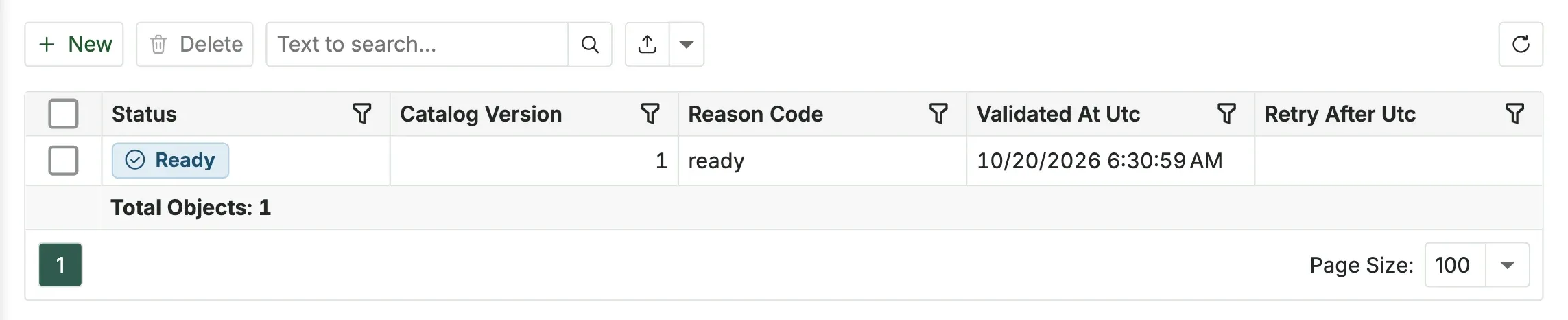
Analyze > Reporting Federation shows one row: the state of the federation on this hub. It is read-only.
| Status | Meaning |
|---|---|
| Ready | Both sides work. Dashboards and reports can use the proxus_reporting tables, and the built-in content is installed. |
| Pending | The hub is setting it up. |
| Degraded | Setting it up failed. The hub tries again every two minutes; Retry After Utc says when. |
| Disabled | The federation is switched off in the configuration file. |
Reason Code says why, for example ready, initializing, federation_disabled, postgres_provisioning_denied (the hub's database user may not create the reporting user), postgres_provisioning_failed, clickhouse_mapping_failed (ClickHouse could not reach PostgreSQL) or federation_initialization_failed. Validated At Utc is the last successful check, and Catalog Version the version of the table list.
While the federation is not Ready, the proxus_reporting tables are not offered in the dashboard and report designers, and the built-in reports and dashboards are not installed.
Switch it on or off
[Reports.ClickHouse]
# Offers the ClickHouse telemetry connection in the report designer.
Enabled = true

[Reports.PostgreSqlFederation]
# Creates the read-only reporting user and the ClickHouse tables that read the hub database.
Enabled = true| Key | Default | Meaning |
|---|---|---|
[Reports.ClickHouse] Enabled | true | Offers the telemetry database as a data source in the report designer, and New Telemetry SQL Report. |
[Reports.PostgreSqlFederation] Enabled | true | Sets up the federation. false stops it and hides the proxus_reporting tables from the designers. |
As environment variables: Reports__ClickHouse__Enabled and Reports__PostgreSqlFederation__Enabled. Restart the hub after a change. See Configuration keys.
The federation needs the telemetry database to be ClickHouse. ClickHouse must be able to reach PostgreSQL on the network with the address in the hub's database connection string (a localhost address is reached as host.docker.internal), and the hub's PostgreSQL user must be allowed to create a user.
What's next
- Dashboards
- Reports
- Architecture: where Proxus keeps which data.
Was this page helpful?
Evaluating Proxus? See it on your own machines in a 30-minute technical session.