How-to guide · for Administrators
Set up Copilot
Add the AI service Copilot answers with. Claude, OpenAI, Azure OpenAI, Amazon Bedrock, Google Vertex AI or Ollama, with a key or your cloud identity.
At the end of this guide, Copilot answers questions with the AI service you chose. You can add more than one service: users then choose which one answers.
Before you start
- An administrator account, or a role with full access to Copilot settings and usage (the built-in IT Administrator; the Auditor may only read). See Users and roles.
- An account with one of these services:
| Service | Sign-in | What you need |
|---|---|---|
| Anthropic Claude | API key | An API key from the Claude Console. |
| OpenAI | API key | An API key from the OpenAI platform. |
| Azure OpenAI | API key, cloud identity or service credential | The resource endpoint (for example https://plant.openai.azure.com) and the name of a model deployment. |
| Claude on Amazon Bedrock | Cloud identity, API key or service credential | An AWS account with access to the Claude models in Amazon Bedrock, and the region. |
| Claude on Google Vertex AI | Cloud identity or service credential | A Google Cloud project with the Claude models enabled in Vertex AI, and the region. |
| Ollama (local) | none | An Ollama server the hub can reach, with a model pulled (for example ollama pull llama3.2). No data leaves your site. |
- For a cloud service, the hub needs outbound HTTPS access to that service.
A Claude.ai or ChatGPT subscription cannot be used: Copilot signs in with an API key or with your company's cloud account. API use is billed separately from those subscriptions; add credit in the service's billing settings before you test.
Choose a sign-in
| Sign-in | What is stored | Use it when |
|---|---|---|
| API Key | The key, encrypted. | The service gives you a key. |
| Cloud Identity | Nothing. | The hub runs in Azure, AWS or Google Cloud with an identity of its own, or its environment has the cloud's credentials. |
| Service Credential | The secret, encrypted. | The hub runs outside that cloud, with a service identity created for it. |
With Cloud Identity, the hub uses the identity it runs as:
| Service | Where the identity comes from | Permission it needs |
|---|---|---|
| Azure OpenAI | Managed identity or workload identity, or the AZURE_TENANT_ID, AZURE_CLIENT_ID, AZURE_CLIENT_SECRET environment variables. Enter Client ID / Access Key ID to pick a user-assigned managed identity. | The Cognitive Services OpenAI User role on the resource. |
| Amazon Bedrock | The IAM role of the host (EC2, ECS, EKS), an AWS profile, or the AWS_ACCESS_KEY_ID, AWS_SECRET_ACCESS_KEY, AWS_SESSION_TOKEN environment variables. | Inference on the Claude models you use. |
| Google Vertex AI | The service account attached to the host, or the key file in GOOGLE_APPLICATION_CREDENTIALS. | The Vertex AI User role in the project. |
With Service Credential, enter the identity and its secret:
| Service | Identity fields | Secret (in API Key or Secret) |
|---|---|---|
| Azure OpenAI | Tenant ID and Client ID / Access Key ID: the Entra ID app's tenant and client id | The client secret. |
| Amazon Bedrock | Client ID / Access Key ID: the AWS access key id | The secret access key. |
| Google Vertex AI | none | The service account's JSON key, pasted whole. Only service account keys are accepted. |
Add a service
Open Platform > Copilot Settings and select New.
Enter a Name that users will recognise, for example
ClaudeorLocal model.Choose the Service. Each service shows its logo. Sign-in and Model are filled in with the usual choice:
Service Suggested model Anthropic Claude claude-opus-5-5OpenAI gpt-5Azure OpenAI none: enter your deployment name Claude on Amazon Bedrock anthropic.claude-opus-5-5Claude on Google Vertex AI claude-opus-5-5Ollama (local) llama3.2You can pick another model after the connection test below loads the service's list.
Fill in the fields the screen shows for that service: Endpoint for Azure OpenAI (and for Ollama when the server is not at
http://localhost:11434; in Docker, use the address of the machine that runs Ollama), Region for Amazon Bedrock (for exampleeu-central-1) and Google Vertex AI (for exampleeurope-west1), Project ID for Google Vertex AI.Choose the Sign-in and enter what it needs (see the tables above).
Select Test Connection (see below) and pick the Model from the list.
Tick Default if this service should answer new conversations. Only one service is the default.
Select Save.
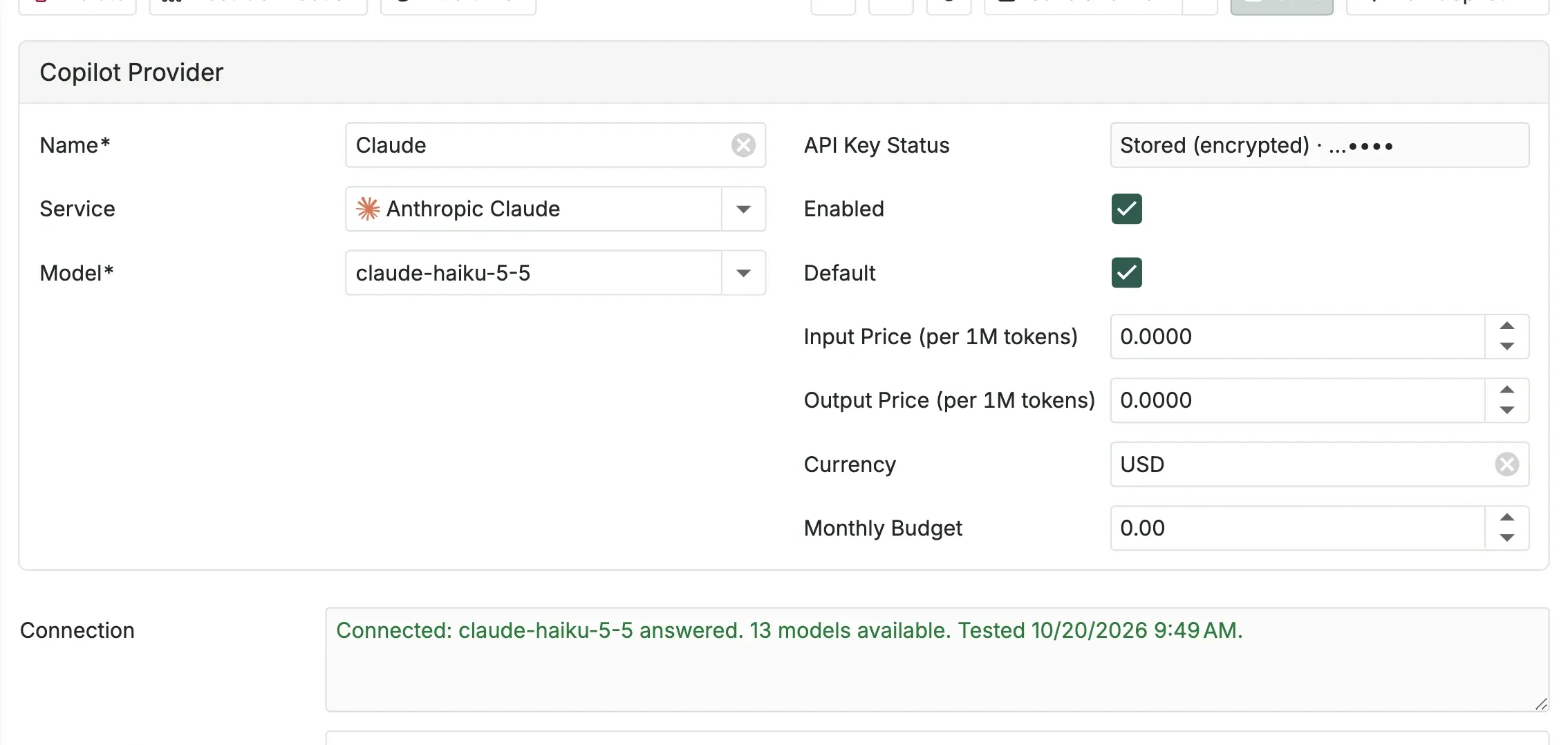
API Key Status shows where the sign-in comes from: Stored (encrypted), the environment variable it uses, or Uses the hub's cloud identity.
Test the connection and choose a model
Test Connection signs in with the settings on screen, even before you save. It then:
- loads the models the service offers to this account into the Model list;
- asks the chosen model a one-word question, which costs a few tokens.
Connection shows the result. It turns green when the model answered, and red with what to fix when something failed:
| Message | What to do |
|---|---|
| Sign-in refused | Check the API key, or the identity and its secret. |
| This account may not use this model | Give the account access to the model in the service's console. |
| The model was not found | Pick a model from the Model list. For Azure OpenAI, enter a deployment name. For Ollama, pull the model first. |
| No credit or quota left | Add credit in the service's billing settings. |
| Too many requests | The service is busy right now. Try again in a minute. |
| The service could not be reached | Check the Endpoint and the hub's outbound internet access. |
| A setting is missing or wrong | Fill in the field it names: Endpoint, Region or Project ID. |
| The key contains spaces or line breaks | Copy the key again and paste it. |
| This is not a Claude API key | Claude API keys start with sk-ant-api. Create one under API Keys in the Claude Console. |
| This is a Claude Admin API key | An Admin key cannot ask questions. Create a normal API key. |
| This is a Claude subscription token | A Claude.ai subscription cannot be used by other applications. Create an API key. |
| This is not an OpenAI API key | OpenAI API keys start with sk-. Create one under API keys on the OpenAI platform. |
| The service returned an error | The message gives the service's own reason. |
The key checks run before anything is sent, so a wrong key costs nothing.
Claude, OpenAI, Azure OpenAI, Ollama and Amazon Bedrock list their models. Google Vertex AI does not, so the list shows the Claude models it usually serves. Before the test, the list offers the usual models of the service (Claude Opus, Sonnet and Haiku 5.5 for the Claude services). Azure OpenAI lists the models of the resource. Its Model is the name of your deployment, which you can type.
You can still type any model name the service accepts. Changing the service, the sign-in, the key or the model clears the result, so test again before you save.
How keys and secrets are kept
- A key or secret is encrypted with the platform key as soon as you save it, the same key that protects the stored certificates (see Certificates). A copy of the database alone does not reveal it.
- It is never shown again. The field shows dots, and API Key Status shows its last four characters so you can tell keys apart. To replace it, paste a new one and save. Leaving the field as it is keeps the stored one.
- With API Key sign-in and no key stored, the hub uses the service's environment variable:
ANTHROPIC_API_KEY,OPENAI_API_KEY,AZURE_OPENAI_API_KEYorAWS_BEARER_TOKEN_BEDROCK.
Decide who may use the Copilot
Each role has a Copilot tab in Security > Roles:
| Field | What it does |
|---|---|
| Copilot Access | No access, Ask questions (the default: Copilot reads with the user's permissions) Ask and propose changes (Copilot may also prepare changes for the user to approve) or Ask, propose changes and run actions (Copilot may also press buttons for the user, such as publishing a pipeline or sending a test message; each still needs its capability and the user's approval). |
| Copilot Daily Token Limit | Tokens one member may use per day, counting what is sent and what comes back. New roles start with 200,000; it cannot be 0. The limit resets at midnight (UTC). |
A user with several roles gets the most generous access and the highest limit among them. Administrators have every right and no limit. Users whose roles have no access do not see the Copilot button or the Copilot page.
To keep a service for some roles only, add them under Allowed Roles on the service. A service with no role listed is open to every Copilot user.
Prices and budget
On each service, Input Price (per 1M tokens) and Output Price (per 1M tokens) take the prices of the service's price list, in Currency (USD unless you change it). Copilot then estimates what each answer cost.
Monthly Budget caps what the service may cost in a calendar month (UTC):
- At 80 percent, a Copilot budget insight appears in Monitor > Copilot > Insights for administrators and the roles that may read Copilot settings and usage. At 100 percent it turns critical.
- At 100 percent, the service stops answering until the next month. Users can switch to another service they are allowed to use.
Leave the budget at 0 for no budget. The estimates come from the prices you entered; the service's own bill is what counts.
Usage
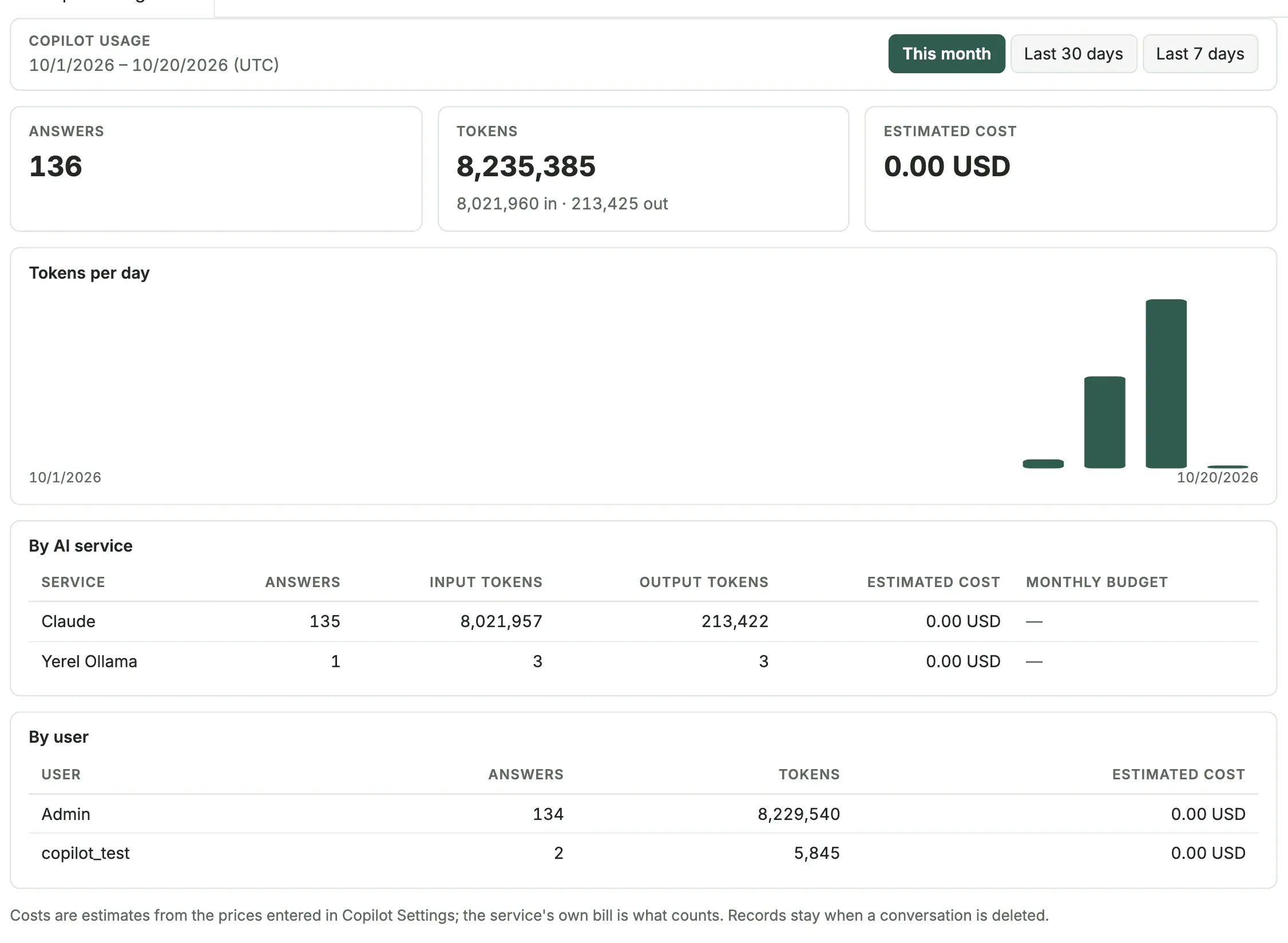
Platform > Copilot Usage shows, for this month, the last 30 days or the last 7 days:
- the number of answers, the tokens and the estimated cost;
- the tokens per day;
- the split by AI service, with each service's budget for the month;
- the split by user.
The records stay when a conversation is deleted. When a service does not report its token counts (some local models), they are estimated from the text and the page says so. Only administrators see this page.
Turn a service off
Clear Enabled and save. Users can no longer choose it, and conversations that used it are answered by the default service. Deleting a service has the same effect.
What reaches the AI service
For each question, the hub sends the question, the earlier questions and answers of the conversation, and the plant data that Copilot reads to answer it: device names and states, latest tag values, alarms and configuration findings. Only data the asking user may read is sent. With Ollama (local), nothing leaves the site; with Amazon Bedrock, Google Vertex AI and Azure OpenAI, the data stays in your own cloud account.
Changes that Copilot proposes are made only when the user approves them, with that user's permissions. See Changes you approve.
Conversations are stored in the hub's database. Administrators can read every conversation in Monitor > Copilot with Show everyone's conversations.
What's next
- Copilot: what Copilot can answer and do, and how changes are approved.
- Users and roles: who may use Copilot.
Was this page helpful?
Evaluating Proxus? See it on your own machines in a 30-minute technical session.