Reference · for Engineers, Operators
Line Status
A dashboard item that draws each production line as a row of machines in flow order, coloured by state, with speed, health and the line's output.
The Line Status item draws each production line as a row of machines in the order the product passes through them. Every machine shows its state, so the machine that holds up a line stands out. Use it on a live plant screen, a line supervisor's dashboard or a control room wall.
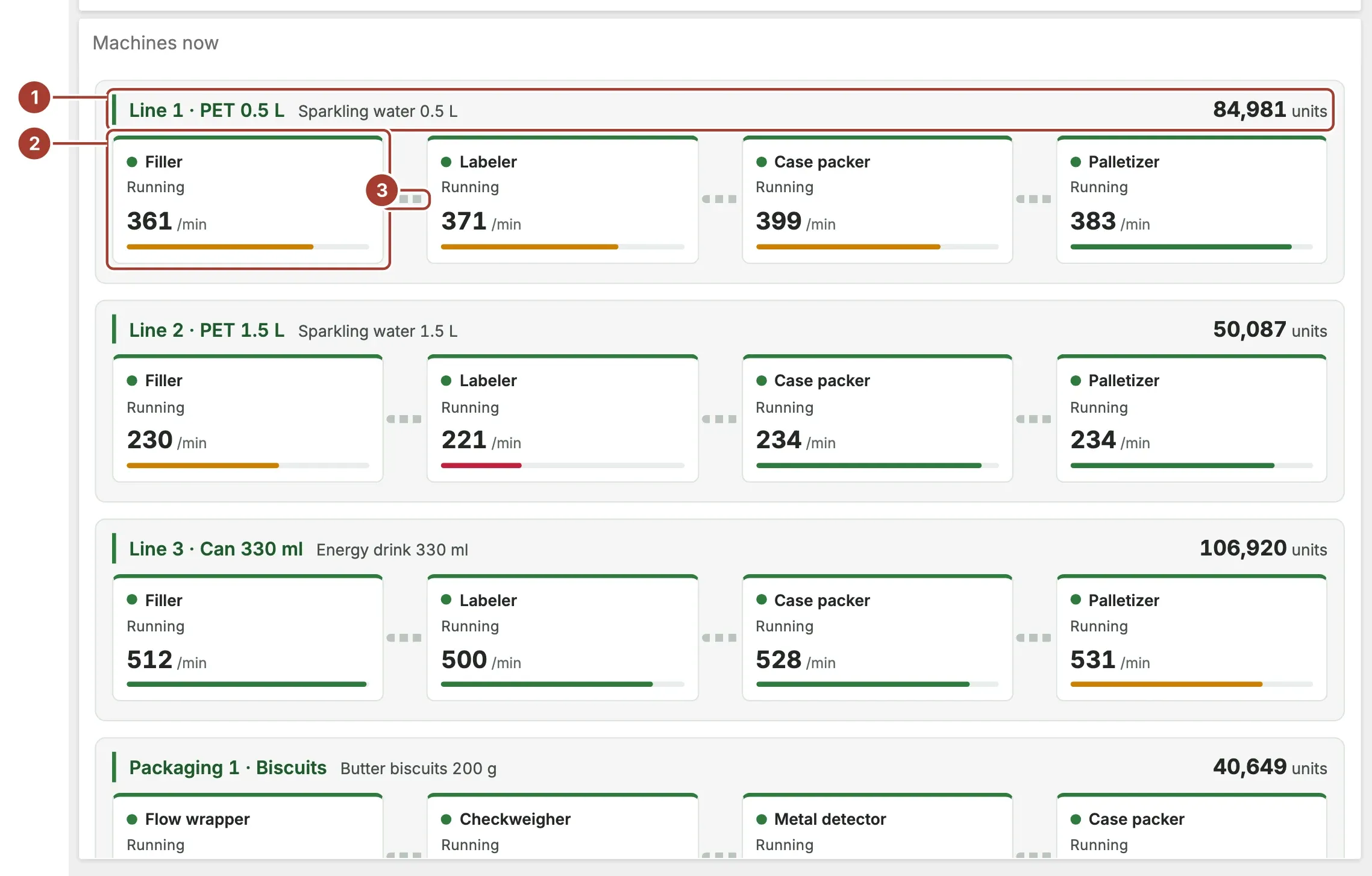
- Line header. The line name, the product it is running and its output, such as good units this shift. The header takes the colour of the worst machine state on the line.
- Machine. One card per machine, in Position order: its name, its state, its speed with the speed unit, and a bar filled to its health. The bar is red below 60, amber below 80 and green from 80 up.
- Conveyor. The link between two machines. It shows as empty when the next machine is starved and as full when the one before it is blocked.
Machine colours follow the state: Running is green, Starved and Blocked are amber, Fault is red, Changeover, Planned maintenance and Cleaning are blue, and Off is grey. Point at a machine for its name and state. When the item filters the dashboard, selecting a machine filters the other items by it.
Data fields
| Field | Kind |
|---|---|
| Line | Dimension |
| Machine | Dimension |
| Position | Dimension |
| State | Dimension |
| Product | Dimension |
| Speed | Measure |
| Health | Measure |
| Output | Measure |
Machine and State are required; without them the item shows "Bind Machine and State to show the lines." instead. State takes the state names above, or the numbers 0 to 7 in this order: Off, Running, Starved, Blocked, Fault, Changeover, Planned maintenance, Cleaning. Any other text is shown as it is, in grey.
Line groups the machines into rows; leave it empty for one row. Position is a number that orders the machines within a line. Health is read as a percentage from 0 to 100. The line's product comes from the first machine in position order that has one, and so does its output, because the machines after it count the same units again. A machine without speed or health simply leaves that part out.
Settings
| Setting | Values | Default |
|---|---|---|
| Speed unit | Text | /min |
| Output unit | Text | — |
- Speed unit is written after each machine's speed, for example
/min. - Output unit is written after the line's output, for example
units. Leave it empty for a plain number.
Where to see it
The Meridian demo plant uses it on Meridian · Live Plant, in the Machines now item: the machines of each line with their state, product, speed per minute, health and good units this shift.
Related
Was this page helpful?
Evaluating Proxus? See it on your own machines in a 30-minute technical session.