How-to guide · for Administrators
Configuration
Where the hub's configuration file lives, how to change it in the Config Editor, and how environment variables override it.
At the end of this guide, you have changed a setting of the hub and the hub runs with it. Most of what you set up in Proxus (devices, rules, users) is stored in the database and changes at once. A smaller set of settings that the hub and its gateway need when they start, such as ports, database connections, log levels and password rules, is in one file: Proxus-config.toml.
Before you start
- Sign in with a user that has the Administrators role.
- Plan a short break: a changed setting only takes effect after a restart.
- Know which key you want to change. Every key is listed in Configuration keys.
Where the file is
| Installation | Location |
|---|---|
Docker (the shipped docker-compose.yml) | /app/config/Proxus-config.toml inside the proxus-ui and proxus-server containers. Both use the same config volume, so they read the same file. |
| Kubernetes | /app/config/Proxus-config.toml on the config volume of each pod. The hub and each gateway have their own volume. |
| Without containers | Next to the program files of the hub or gateway. |
If the file is missing when Proxus starts, Proxus writes a new one with the default values. An upgrade does not replace an existing file.
The same folder holds the keys the hub creates for itself, among them keys/STORE/certificate-store.key, the key that decrypts the private keys in the Certificate Store. Back up the whole folder, not only the file. See Backup and restore.
The file in short
The file is in TOML: sections in square brackets, then Key = value lines. A # starts a comment.
[Logging]
Loglevel = 3        # 0 Trace, 1 Debug, 2 Information, 3 Warning, 4 Error, 5 Critical
LogToFile = true

[Security]
Lockout.MaxFailedAccessAttempts = 3
The main sections:
| Section | What it sets |
|---|---|
[Service] | Ports and addresses of the hub and gateway, the HTTPS ports, and the names the hub's certificates cover. |
[NATS] | How the hub and the gateway reach the message broker, and the extra names of its TLS certificate. |
[Database], [ClickHouse] | The configuration database and the telemetry database: connection, retention. |
[Security], [Security.Password] | Lockout after wrong passwords and password rules. |
[Rules.DeviceNaming] | An optional naming rule for device names. |
[Data] | Time ranges and limits for lists and logs on screen. |
[EdgeGateway] | The gateway's ID, name and mode. |
[Fieldbus], [Browse] | How devices are read and discovered. |
[MQTTBroker], [UNS] | The built-in MQTT broker (with its TLS port) and the Unified Namespace topics. |
[ScheduledDelivery] | Sending reports by email. |
[Logging], [Metrics], [Tracing], [Otlp] | Logs, metrics and their export. See Monitoring. |
[MCP] | Access for AI agents. See MCP. |
HTTPS and certificate settings
These keys decide how the hub is reached over TLS. Their meaning is in Configuration keys.
[Service]
UI-HTTPS-Port = "8443"               # empty turns HTTPS off
# RedirectHttpToHttps = "false"      # "true" sends HTTP to HTTPS and turns on HSTS
# PublicHttpsPort = "8443"           # the port others reach HTTPS on, if published differently
# PublicHostNames = "proxus.plant.example, 203.0.113.10"

[NATS]
# TlsHostNames = "nats.plant.example"

[MQTTBroker]
TlsPort = 8883                       # 0 turns MQTT over TLS off
PlainEnabled = true                  # false accepts TLS only
Add every name and address users or gateways use to reach the hub to PublicHostNames. The hub's HTTPS and NATS certificates then cover them. Addresses you choose when you create a gateway install command are added to the NATS certificate automatically.
Change a setting in the Config Editor
- Go to Platform > Config Editor. The whole file opens as text.
- Find the key and change its value.
- Select Save.
- Confirm the warning Confirm Configuration Changes. The file is written.
- Proxus asks Confirm Platform Restart. Select Restart to restart now, or restart later yourself.
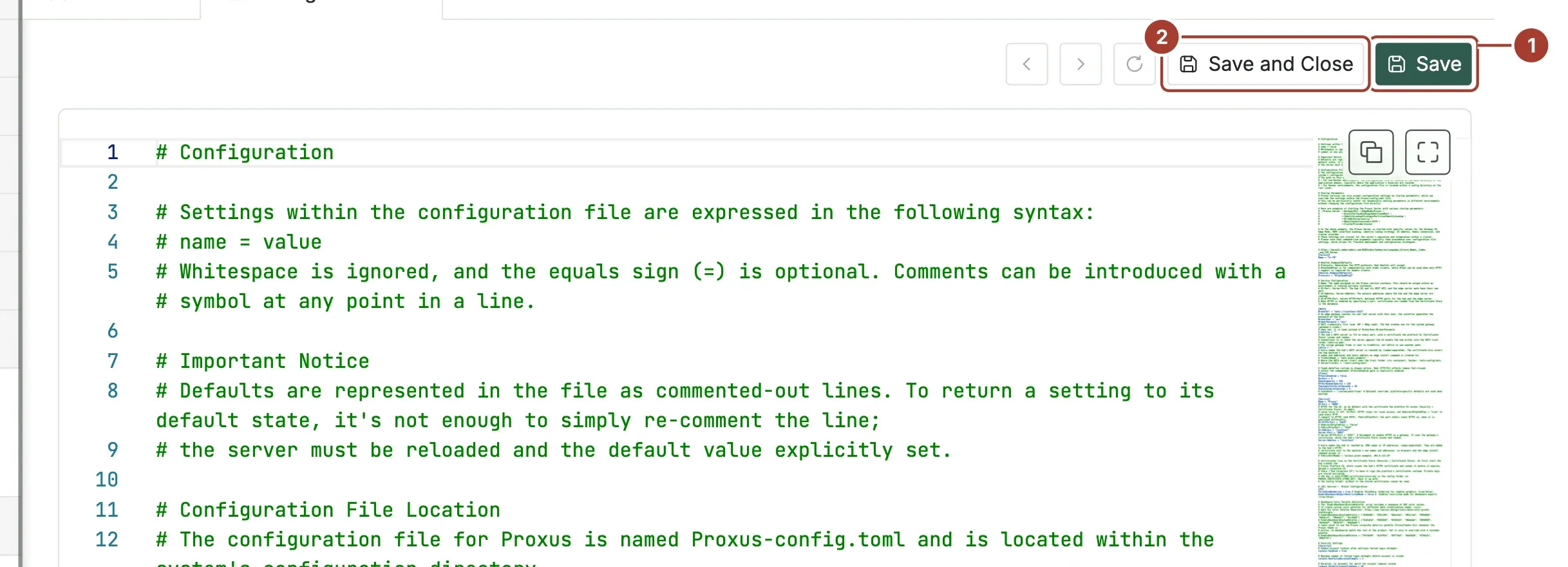
- Save writes the file and keeps the editor open.
- Save and Close writes the file and closes the editor.
Restart restarts the containers of the Docker Compose project named proxus, the hub last. It works only on Docker, and only when the stack was started with that project name (see Docker). Otherwise restart the stack yourself:
docker compose -p proxus restartEvery save writes a warning with your user name to the system logs.
To return a key to its default
Default values are written in the file as comment lines. Removing a value or turning it back into a comment does not restore the default. Type the default value explicitly, save and restart.
Environment variables win over the file
Each key can also be set as an environment variable. The name is the section and the key joined with two underscores, for example:
| In the file | As an environment variable |
|---|---|
[Logging] Loglevel | Logging__Loglevel |
[NATS] BrokerUrl | NATS__BrokerUrl |
[Service] UI-HTTPS-Port | Service__UI-HTTPS-Port |
[Service] PublicHostNames | Service__PublicHostNames |
An environment variable overrides the file. The shipped docker-compose.yml already sets some, for example Logging__Loglevel: "3" on the hub and NATS__BrokerUrl on both containers. A change to these keys in the Config Editor has no effect until you also change or remove the variable in the compose file.
One environment variable has no key in the file: PROXUS_CERTIFICATE_STORE_KEY. Set it (a base64 value of 32 bytes) to give the Certificate Store its key from outside, for example from a Kubernetes Secret, instead of the file keys/STORE/certificate-store.key. Keep it safe: without it, the stored certificates cannot be read.
What's next
Was this page helpful?
Evaluating Proxus? See it on your own machines in a 30-minute technical session.