Reference · for Engineers, Operators
Hierarchical tree view
A dashboard item that builds a tree, such as company, plants, lines and machines, from rows that name their parent.
The Hierarchical tree view builds a tree from rows that each name their parent: a company, its plants, their lines, their machines. Use it as a navigator on the side of a dashboard, so the reader picks a plant or a machine and the other items show only that part.
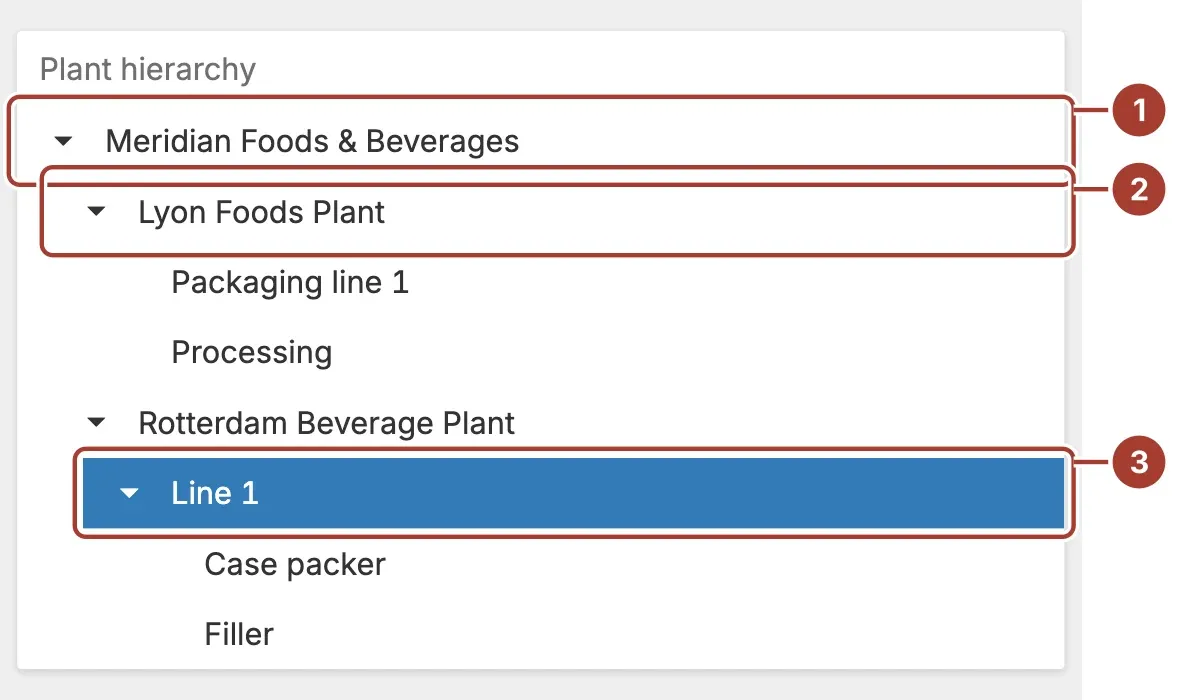
- Root node. A row without a parent, here the company.
- Child node. A row whose Parent ID is the ID of the node above it, indented one step. The arrow in front of a node opens and closes its children; the tree starts closed.
- Selected node. The node you selected, highlighted.
Select a node to filter the other items of the dashboard by it. When the item's master filter allows several values, selecting a node also selects every node below it, so choosing a plant filters by the plant, its lines and its machines.
Data fields
| Field | Kind |
|---|---|
| ID | Dimension |
| Parent ID | Dimension |
| Dimensions | Dimension |
All three fields are required; until each has a field, the item draws nothing.
- ID identifies a row. Give each row its own value.
- Parent ID is the ID of the row above it in the tree. A row whose Parent ID is
-1is a root node. - Dimensions is the text shown for the node, such as the plant or machine name.
The item compares ID and Parent ID as they are displayed, so give both fields the same type and format.
Related
Was this page helpful?
Evaluating Proxus? See it on your own machines in a 30-minute technical session.