Reference · for Engineers, Operators
OEE
A dashboard item with one OEE ring per line or plant, showing availability, performance and quality under each ring.
The OEE item shows overall equipment effectiveness together with the three figures it is made of: availability, performance and quality. Use it where a team needs one number per line or plant and the reason behind it: a plant overview, a line performance dashboard, a shift start screen.
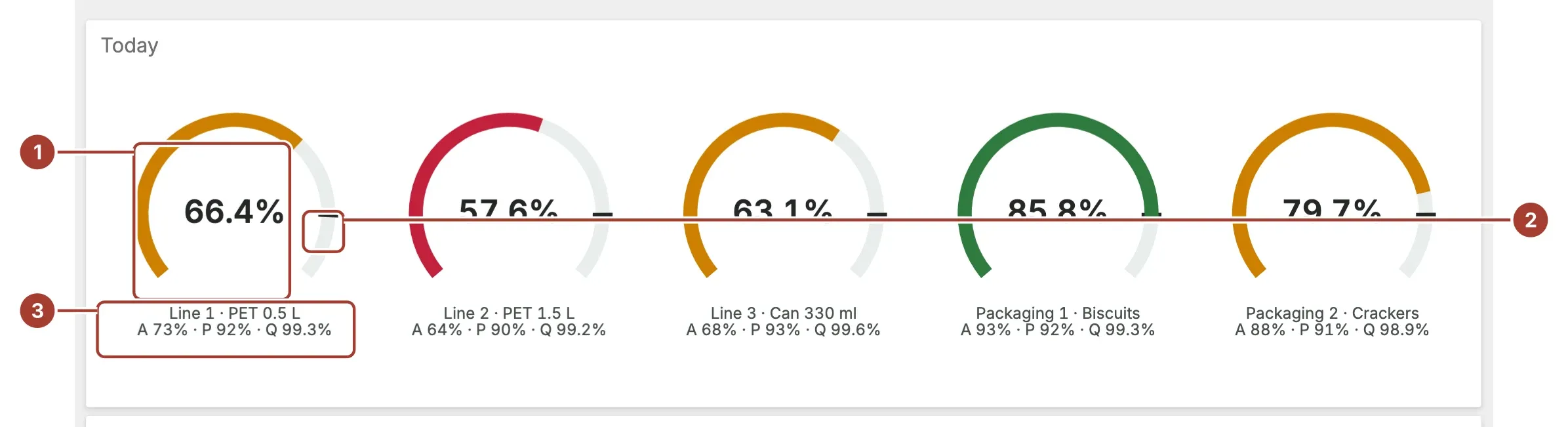
- Ring. One ring per value of the Label field, such as a line. The figure in the centre is the OEE and the ring is filled to it. The ring is red below 60 %, amber below the Target value and green from the target up.
- Target. With Show Target on, a dark notch on each ring marks the Target value.
- Label and figures. Under each ring: the label, then availability (A), performance (P) and quality (Q).
Point at a ring for its exact figures. When the item filters the dashboard or drills down, selecting a ring applies that ring's label.
When the data gives only one row, for example without a Label, the item draws a single large OEE gauge with a pointer instead, and three small gauges below it for availability, performance and quality.
Data fields
| Field | Kind |
|---|---|
| Availability (%) | Measure |
| Performance (%) | Measure |
| Quality (%) | Measure |
| OEE (%) | Measure |
| Label | Dimension |
Availability (%), Performance (%) and Quality (%) are required; without them the item stays empty. Each is read as a percentage, so 92 means 92 %. OEE (%) is optional: leave it empty and the item works it out as availability × performance × quality. A row with one of the three figures missing is left out. Label splits the item into one ring per value; without it, everything is one gauge labelled OEE.
Settings
| Setting | Values | Default |
|---|---|---|
| Max value | A number from 1 to 1000 | 100 |
| Show Target | No, Yes | No |
| Target value | A number from 0 to 1000 | 85 |
| Show Details | No, Yes | Yes |
- Max value is the end of the scale. Keep it at 100 for percentages.
- Target value also sets where a ring turns from amber to green, whether or not Show Target is on.
- Show Details applies to the single gauge: it writes availability, performance and quality as a line of text above it. The rings always show these figures.
Where to see it
The Meridian demo plant uses it on Meridian · Live Plant (the Today item) and on Meridian · Line Performance (the OEE per line item). Both show one ring per production line with an 85 % target.
Related
Was this page helpful?
Evaluating Proxus? See it on your own machines in a 30-minute technical session.