Reference · for Engineers, Operators
Parameters
A dashboard item that shows the dashboard parameters on the dashboard itself, so they can be changed without opening a dialog.
The Parameters item shows the parameters of the dashboard, such as the number of days it covers or the line and shift it looks at, as a list on the dashboard. Use it where operators change these values often: they see the current values at a glance and change them in place.
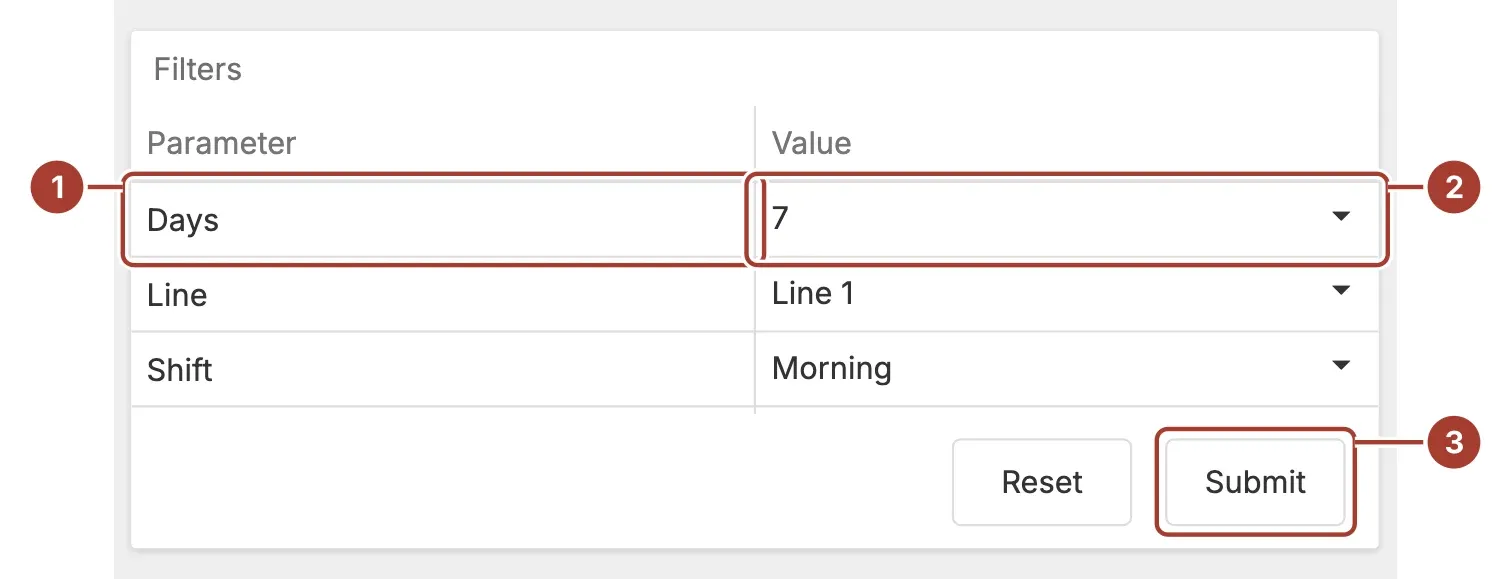
- Parameter name. One row per dashboard parameter.
- Value. The current value, in the same editor the Dashboard Parameters window uses for that parameter.
- Reset and Submit. Submit applies the values you changed to the dashboard. Reset returns them to their defaults.
The item takes no data fields and needs no data source. It lists the parameters you defined for the dashboard. While it is on the dashboard, the Dashboard Parameters button in the dashboard title bar is hidden, since the item does the same job.
Settings
| Setting | Values | Default |
|---|---|---|
| Show headers | On, Off | On |
| Show parameter name | On, Off | On |
| Automatic updates | On, Off | Off |
- Show headers shows or hides the column headings above the list.
- Show parameter name shows or hides the name column. Turn it off when the item caption already says what the value is, for a single parameter.
- Automatic updates applies each change as soon as you make it. The Reset and Submit buttons are then hidden. Leave it off when a change reloads a lot of data and you want to set several values first.
Related
Was this page helpful?
Evaluating Proxus? See it on your own machines in a 30-minute technical session.