How-to guide
Register a customer
Register a company you are working on so it is protected for you, follow its status and ask for an extension.
At the end of this guide, a company you are working on is registered for your partner company and waits for Proxus to approve it.
Before you start
- You belong to a partner company in the Proxus portal. See Join your partner company.
- The company's name. Its tax number, website and a contact person help Proxus decide quickly.
Register the company
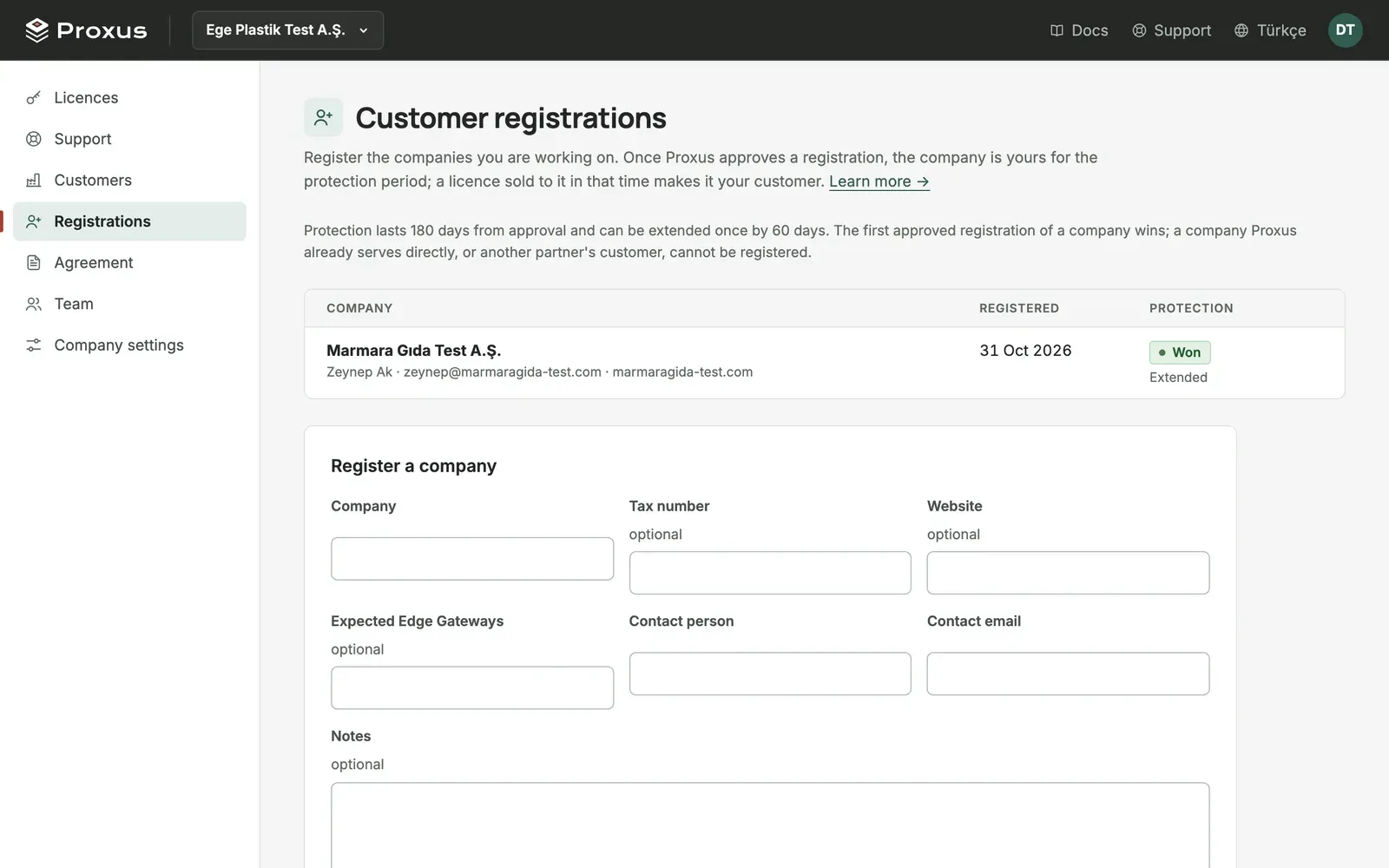
- In the Proxus portal, choose your partner company in the menu at the top left and select Registrations.
- Under Register a company, fill in:
- Company: the company's name.
- Tax number and Website: help Proxus tell it apart from companies with similar names.
- Contact person and Contact email: who you talk to there.
- Expected Edge Gateways: how many production gateways you expect it to need.
- Notes: anything Proxus should know, for example the project or the timing.
- Select Send for approval.
The registration appears in the list as Waiting for approval. You get an email when Proxus decides. If you have already registered the company, the portal tells you so.
Ask for an extension
If you are still working with the company when protection is about to end, ask for more time. You can do this once for each registration.
- Open Registrations.
- Next to the protected registration, select Ask for an extension.
The registration shows Extension requested. You get an email when Proxus decides.
What's next
Was this page helpful?
Evaluating Proxus? See it on your own machines in a 30-minute technical session.