How-to guide · for Administrators, Engineers
Audit trail
See the change history of a device, profile, rule, user or any other record. Who changed it, when, which field, and the old and new value.
At the end of this guide, you know who changed a record, when, and what it looked like before. Proxus writes every change to a saved record into its audit trail: a new device, a changed tag address, a deleted rule, a role that got a new permission.
Before you start
- The record you want to check, for example a device profile.
- Administrators see every change. Users with the Default role see only the changes they made themselves. For other roles, the role needs read access to the audit records.
Open the change history of a record
- Open the record, for example Connect > Device Profiles and then the profile
Dough mixer. - Select Audit Trail in the toolbar.
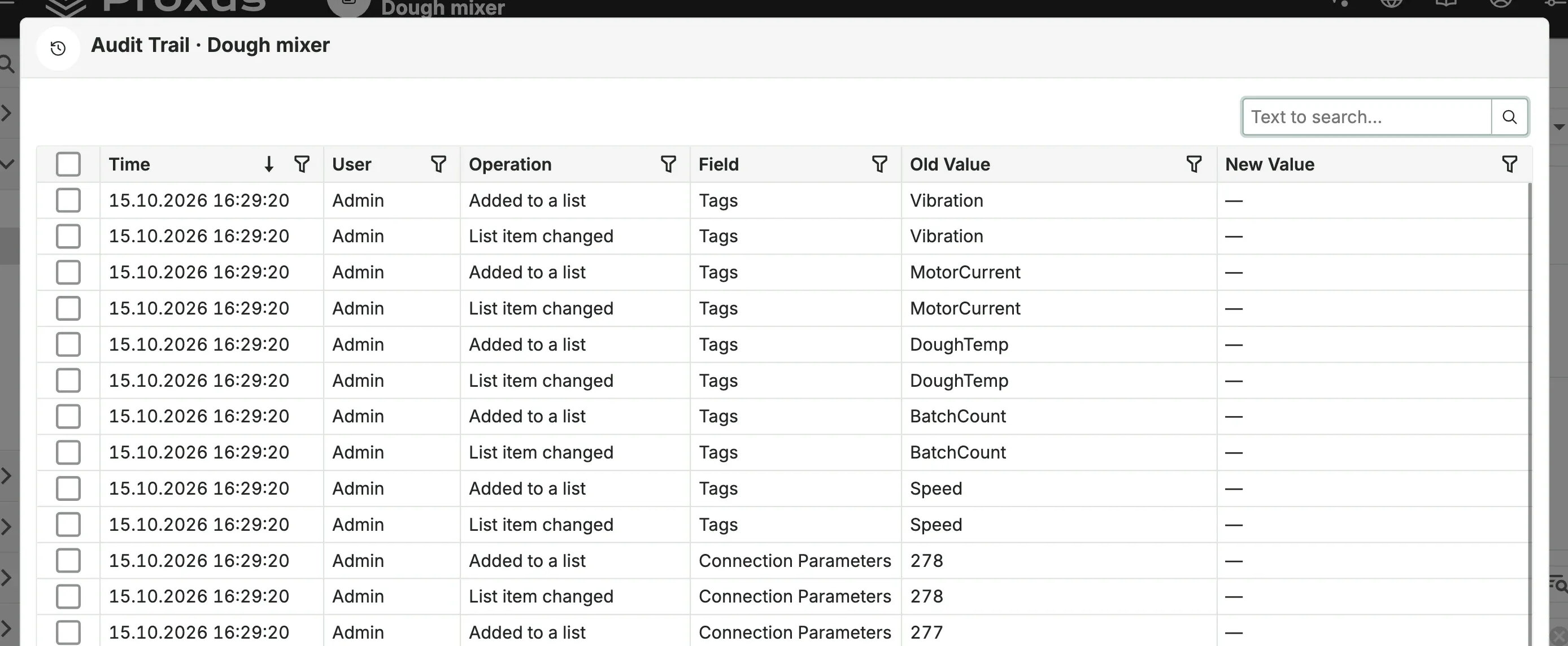
The window lists every change, newest first:
| Column | Meaning |
|---|---|
| Time | When the change was saved. |
| User | Who saved it. |
| Operation | What happened: an object was created, a field was changed, an item was added to or removed from a list, an object was deleted. |
| Field | The field that changed. Shown by its caption on screen; no value shows as a dash, a boolean as Yes or No. |
| Old Value and New Value | The value before and after. |
Use Text to search... to find a field or a value, and the filter icons in the column headers to show one user or one kind of change. The window is read-only. Select Close to leave it.
Where a change came from
With each change, Proxus also records where it came from:
- a browser session, with a short session ID, the IP address and the browser and system, for example
Browser session 3f2a9c1b · 10.20.0.31 · Chrome on Windows; - the REST API (
Web API), with the IP address. Changes made by AI agents through the MCP server arrive this way; Background taskfor changes Proxus makes by itself.
How long changes are kept
Audit records are kept until you delete them; there is no setting that removes old ones. They are stored in the configuration database, so they are part of every database backup.
What's next
Was this page helpful?
Evaluating Proxus? See it on your own machines in a 30-minute technical session.