Reference · for Engineers, Operators
Simple table
A dashboard item that writes its data as a plain bordered table, one column per field and one row per combination of dimension values.
The Simple table writes the data as a plain table with borders: one column per field, one row per combination of the dimension values. Use it where you want the figures themselves, small and without decoration, such as a summary next to a chart or a short list on a shift screen.
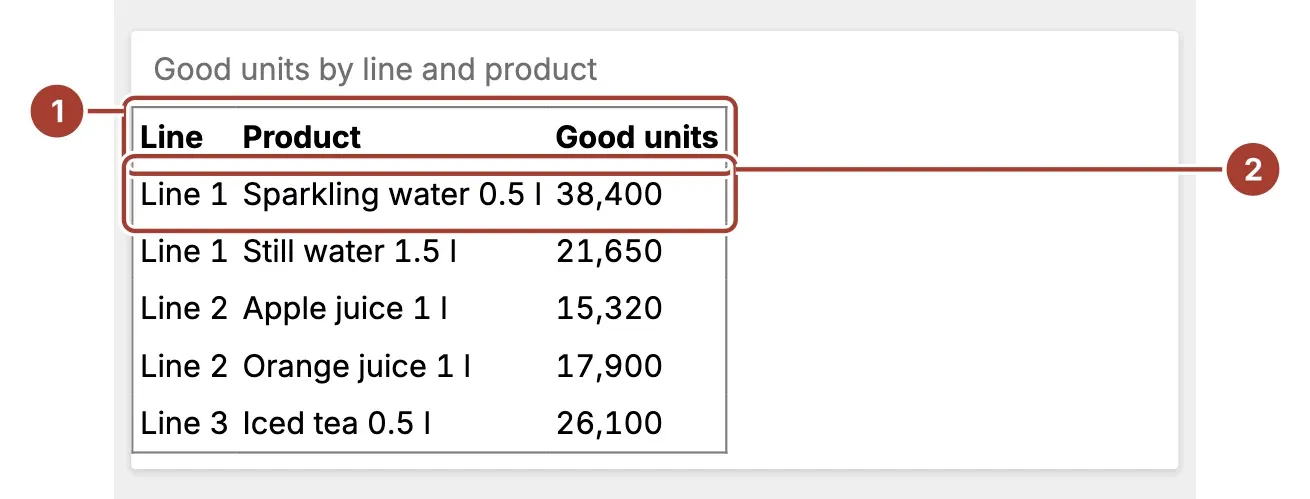
- Header row. The names of the fields, in the order you added them. Show headers can hide it.
- Row. One combination of the dimension values, such as a line and a product, with the measure in the last column. Values are written as each field formats them.
The table scrolls when it does not fit the item. It does not filter other items.
Data fields
| Field | Kind |
|---|---|
| Custom Dimensions | Dimension (one or more) |
| Custom Measure | Measure |
Add one or more fields to Custom Dimensions; they become the first columns, in the order you add them. Custom Measure is one number, added up for each row and shown in the last column. The rows follow the sort order of the dimensions.
Settings
| Setting | Values | Default |
|---|---|---|
| Show headers | Auto, Off, On | Auto |
| Text Color | Light, Dark | Dark |
- Show headers shows the header row with Auto and On, and hides it with Off.
- Text Color writes the text in grey (Light) or black (Dark).
Related
Was this page helpful?
Evaluating Proxus? See it on your own machines in a 30-minute technical session.