How-to guide · for Administrators
License
Activate Proxus with a key, read what your license allows, watch each gateway's capacity, and deactivate a license before you move it.
At the end of this guide, the hub runs with an active license and you know how much of it each edge gateway uses.
Before you start
- Sign in with a user that has the Administrators role.
- To activate: a license key from Proxus or your distributor, issued for this installation's License ID.
What a license contains
A Proxus license sets these entitlements:
| Entitlement | Meaning |
|---|---|
| Production gateways | How many edge gateways may run, the hub's own SYSTEM gateway included. |
| Capacity tier | The size of each gateway: how many values per second it may pass on. The tiers and their rates are on Pricing. |
| Sustained data points/sec (per gateway) | Values per second a gateway may pass on all the time. |
| Burst data points (per gateway, ~3 s) | A short reserve above the sustained rate, for peaks. |
| White Labeling | Whether you may show your own title and logo. See White labeling. |
The license also has an expiry date. It is checked on the hub against a signature, so checking it needs no internet connection. To ask for a license, a larger tier or an extension, use the contact form or ask your distributor. On a network without internet access, see Install without internet access.
Activate a license
When the hub has no valid license (a new installation, an expired license), the License Activation window opens after you sign in.
- Copy the License ID with Copy and send it to Proxus or your distributor. The key they send back works only for this ID.
- Paste the key into License key.
- Tick I have read and accept the End User License Agreement.
- Select Activate License.
Select Sign out to leave the window without activating.
Read your entitlement and live capacity
Go to Platform > License Info. The window shows the capacity tier and the expiry date at the top.
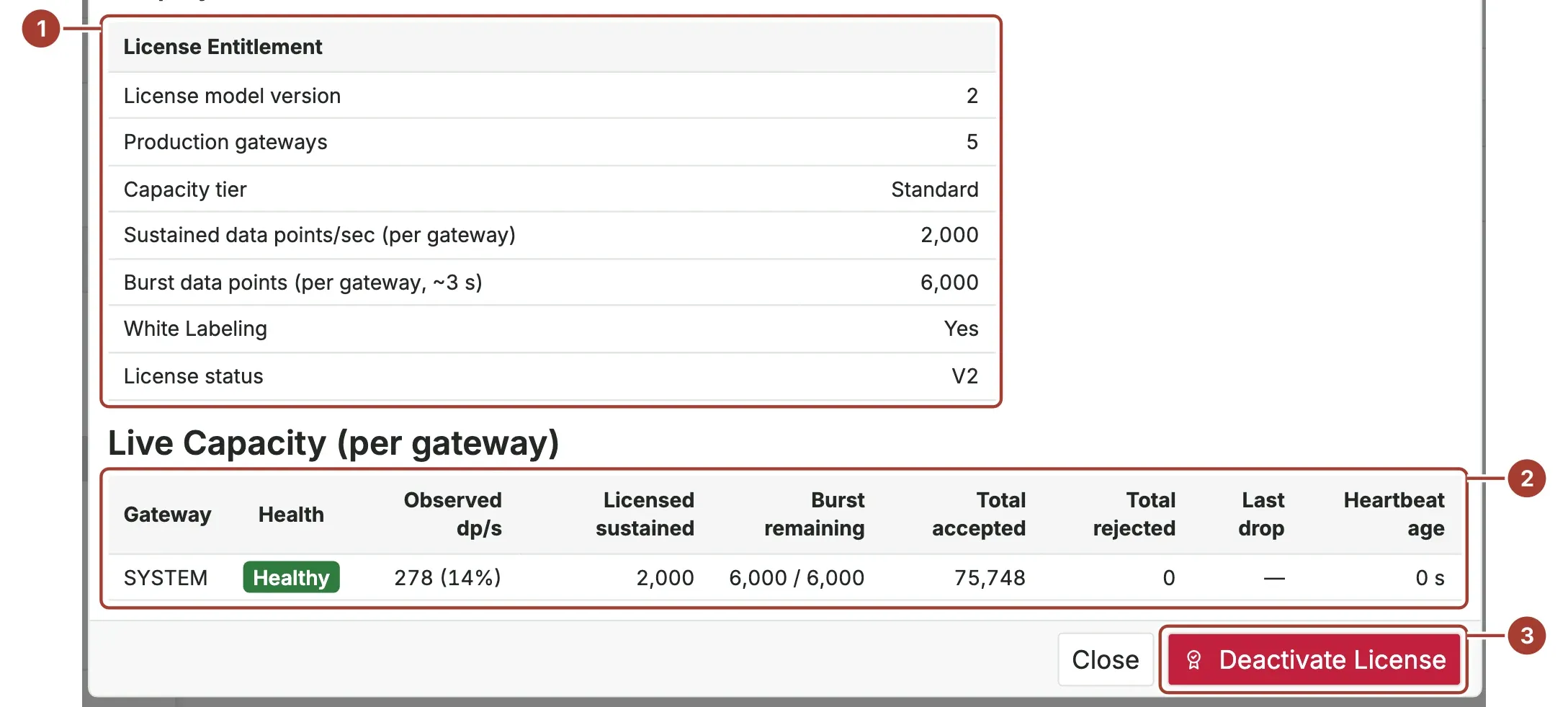
- License Entitlement: what the license allows. License status is V2 for a current license.
- Live Capacity (per gateway): for every running gateway, its Health, the values per second it passes on now (Observed dp/s) against the licensed rate, the burst reserve left, and how many values it accepted and rejected since it started.
- Deactivate License removes the license from this hub.
Health is Healthy below 70 % of the sustained rate, Warning from 70 %, Critical from 90 %, and Exceeded when the gateway has rejected values. Stale means the hub has had no report from that gateway recently. Until a gateway reports, the table says it is waiting for the edge gateway heartbeat.
What happens at the limits
| Limit | What Proxus does |
|---|---|
| Number of gateways reached | New and Clone are not available on the edge gateway list. A gateway above the limit is not started, and a "License limit" warning is logged. |
| A gateway reads more than its sustained rate | It uses its burst reserve. When the reserve is empty, it drops the values above the limit. They are counted in Total rejected, and Health shows Exceeded. |
| License expired or invalid | The License Activation window opens at sign-in with the reason. Users cannot work until a valid key is activated. |
| An edge gateway gets no license from the hub | The gateway stops if the hub does not send it a license within five minutes of starting. |
Deactivate a license
Deactivate a license when you retire an installation or move the license to another one.
- Open Platform > License Info.
- Select Deactivate License and confirm with Deactivate.
The license is removed and you are signed out. Licensed features stop until a license is activated again.
What's next
Was this page helpful?
Evaluating Proxus? See it on your own machines in a 30-minute technical session.