How-to guide · for Operators, Engineers
Export a trend
Download the values shown in the Trend Workspace as a CSV or Excel file, and know what each file contains.
At the end of this guide you have a file with the values of the tags on your chart, one row per moment and one column per tag.
Before you start
- Open the tags and the range you want in the Trend Workspace. See Compare tags over time.
- The export contains numeric tags only. Text and on/off tags are left out.
Export
- Wait until the chart has loaded. The export buttons are disabled while it loads.
- If you need amounts as well as values (energy from power, volume from flow), tick Show total over time.
- Next to Export, select CSV or Excel. The file is downloaded by your browser.
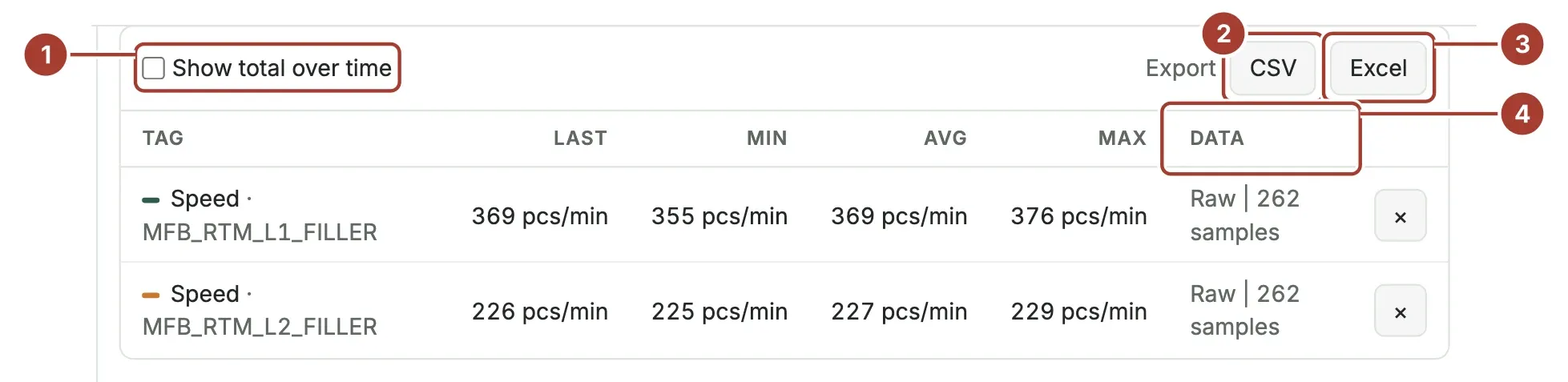
- Show total over time adds the Total column.
- CSV downloads a text file.
- Excel downloads an
.xlsxworkbook. - Data shows how the values were drawn. The file holds the same points as the chart: over long ranges these are averages per time step, not every stored value. For raw values, choose a shorter range first.
The file name holds the range, for example trend-20261015-1338-20261015-2138.csv.
What is in the files
- First column
time_utc(ISO time in UTC), secondtime_local(in your browser's time zone), then one column per tag namedTag · Device [unit]. - One row per moment at which any tag has a value. A tag without a value at that moment has an empty cell.
- Comma as separator and a dot as decimal sign, whatever your language, so other tools read it the same way. The file is UTF-8 and opens in Excel with device names intact.
time_utc,time_local,Speed · MFB_RTM_L1_FILLER [pcs/min],Speed · MFB_RTM_L2_FILLER [pcs/min]
2026-10-15T11:38:00.000Z,2026-10-15 13:38:00.000,392.4,231.7- Sheet Data: the local time (the time zone is in the header) and one column per tag.
- Sheet Summary: From, To and Time zone of the range, then one row per tag with Last, Min, Avg, Max, Total and Data, as in the table on screen.
What's next
- Reports: scheduled, formatted output of the same data.
- Telemetry API: read stored values from your own program.
Was this page helpful?
Evaluating Proxus? See it on your own machines in a 30-minute technical session.