Explanation · for Administrators
Choose how people sign in
Proxus passwords, Active Directory or LDAP, Keycloak, or your company's identity provider. What each one needs, what it gives, and which to pick.
People can sign in to Proxus in four ways. One hub can use several of them at once: each user signs in the way their account was made.
| Proxus password | Active Directory or LDAP | Keycloak | Your identity provider | |
|---|---|---|---|---|
| People and passwords are kept in | Proxus | Your directory | Keycloak, or your directory through it | Entra ID, Okta, AD FS, ... |
| Roles come from | Proxus | Directory groups | Keycloak groups | Provider groups |
| On the sign-in page | User name and password | User name and directory password | Log In with … button | Log In with … button |
| Second step (MFA) | Proxus two-step verification | Proxus two-step verification | Keycloak | The provider |
| One account for other applications | No | The same password | Yes | Yes |
| Windows sign-in without a password | No | No | Yes (Kerberos) | Depends on the provider |
| Needs internet access | No | No | No | Usually yes |
| What you install | Nothing | Nothing | Keycloak, from the Proxus package | Nothing |
| Guide | Users and roles | Active Directory and LDAP | Keycloak | Single sign-on |
Which one to pick
- A few people, no company directory: Proxus passwords, with two-step verification for administrators.
- Your plant has Active Directory, and people should use their Windows user name and password: Active Directory or LDAP. Nothing else to run.
- People should sign in once for several applications, or without typing a password on domain PCs: Keycloak, connected to Active Directory if you have one.
- Your company already uses Microsoft Entra ID, Okta or another provider: your identity provider.
See how each person signs in
Security > Users shows it in the Sign-in column (1): Proxus password, Directory (LDAP), Windows, or Single sign-on with the name of the provider.
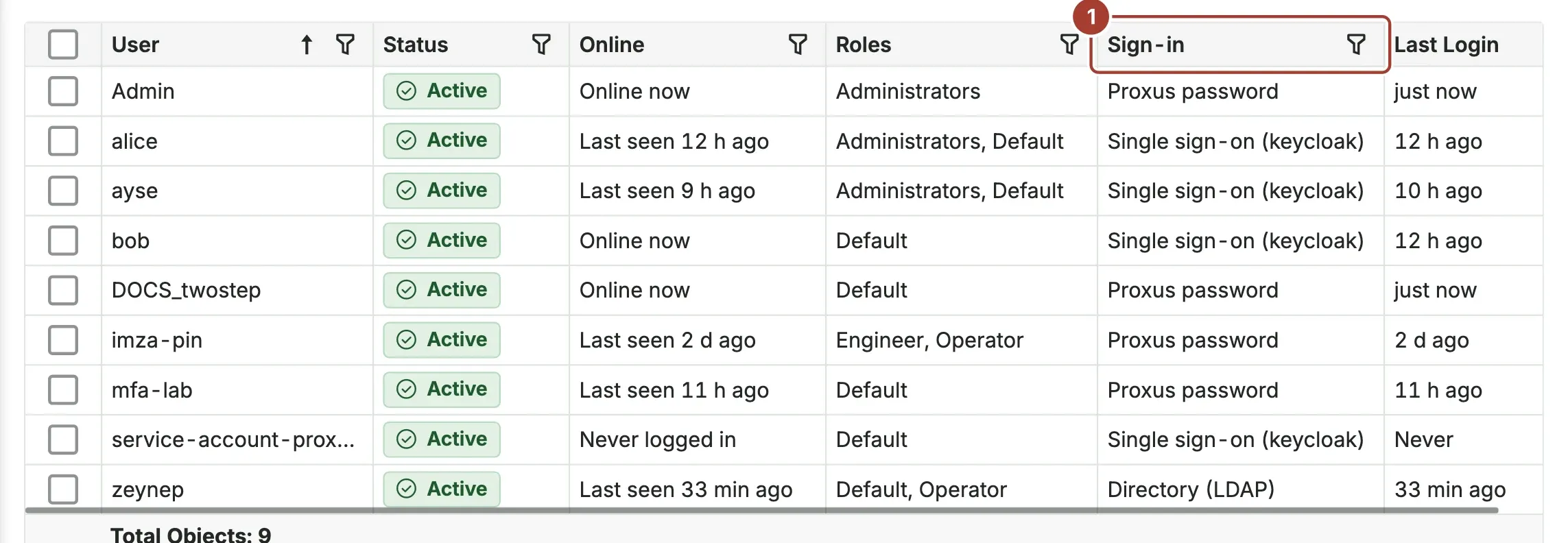
People who sign in through a directory or a provider have no Proxus password: Proxus does not offer them Change My Password, Reset Password or Force Password Change. They change their password where it is kept.
Keep a way in
Whichever you choose, keep at least one administrator who signs in with a Proxus password and two-step verification. When the directory or the provider cannot be reached, that account still opens Proxus.
What's next
- Users and roles
- Security: the hardening checklist
Was this page helpful?
Evaluating Proxus? See it on your own machines in a 30-minute technical session.